


Ask for the system. AI builds it, tests it and puts it live.
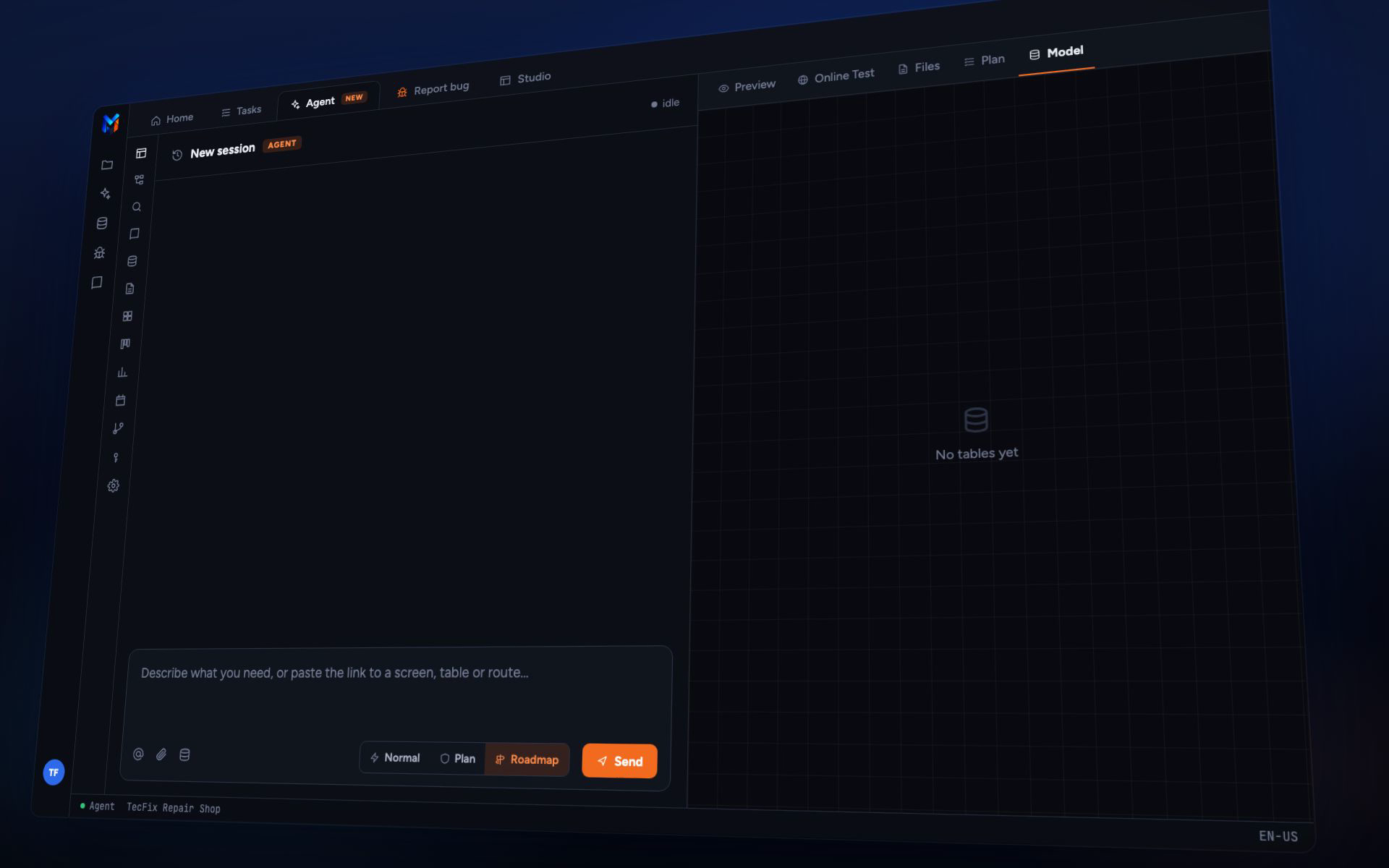
Describe in English what you need. The agent creates the database, the screens and the rules, and you tweak whatever you want in the visual editor.
- Tested by the agent, which fills in, saves and checks every screen
- Per-screen permissions, 2FA and change history out of the box
- The system is yours: if you switch vendors, it goes with you
Comes ready-made, no starting from scratch
- Login with 2FA
- Per-action permissions
- Change history
- Dashboards
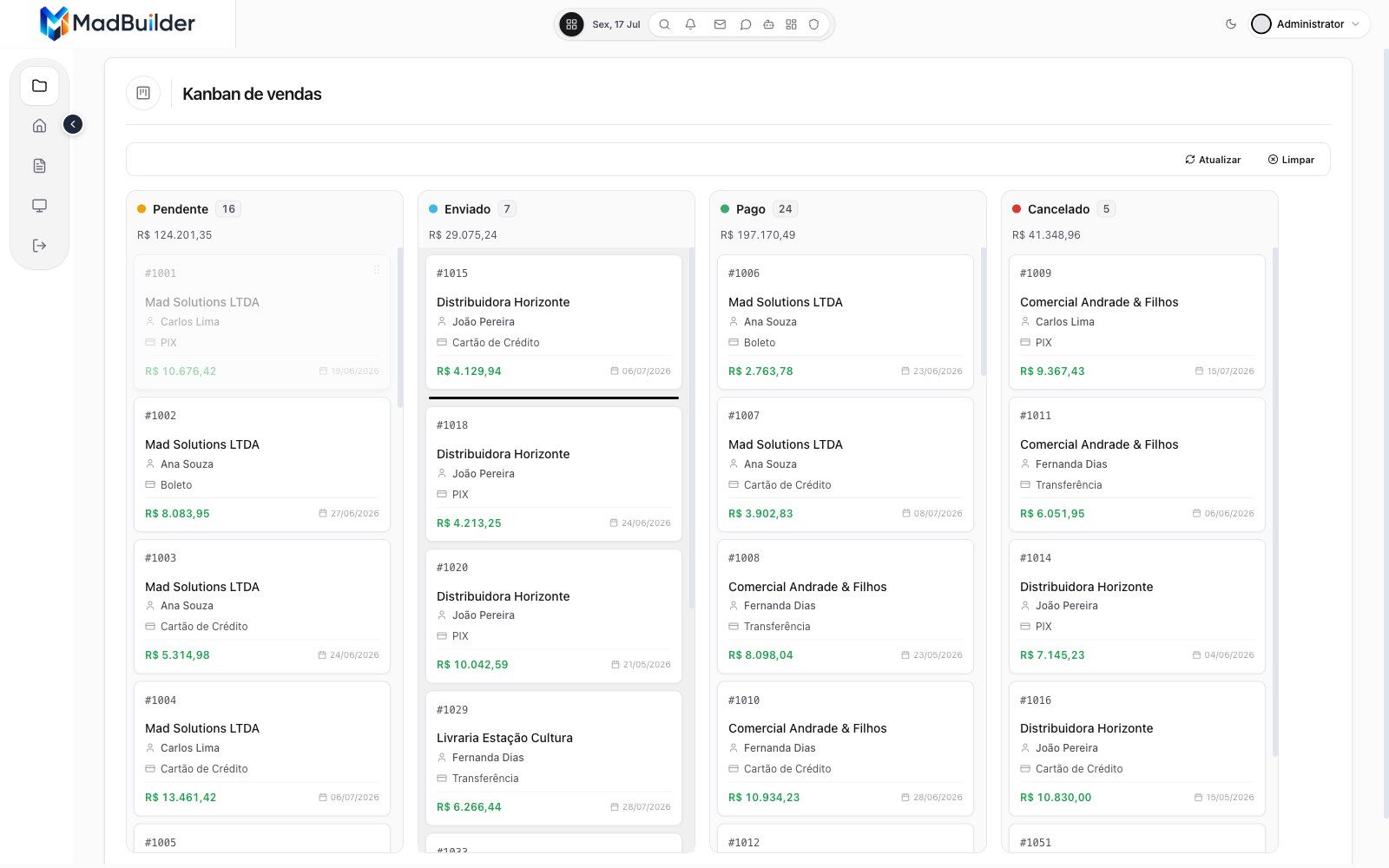
- Kanban and calendar
- Point of sale
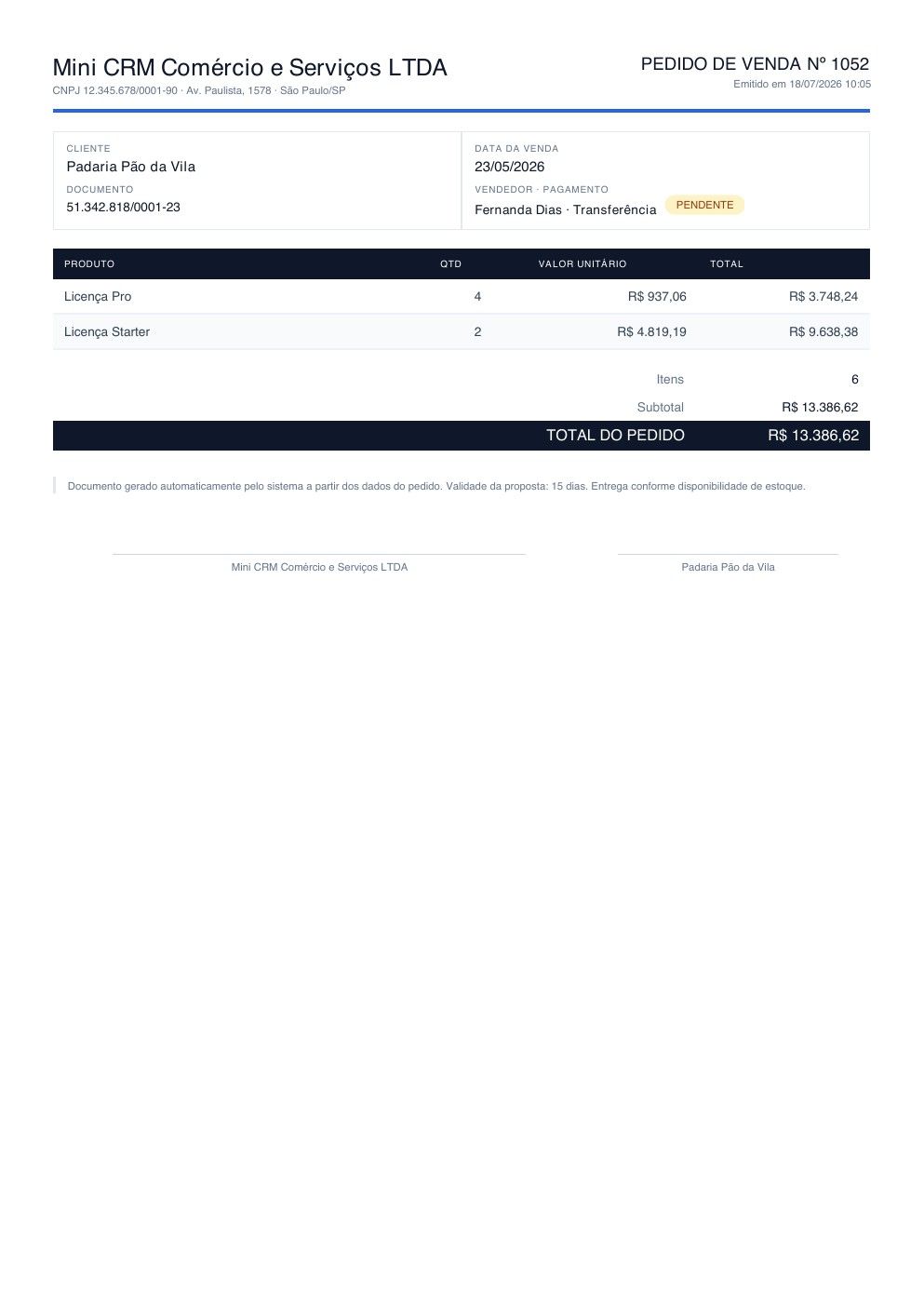
- PDF with QR code
- Pix, card and boleto
- Public website
- Four languages
Want a whole system already built? MadFood is a ready-made delivery system for pizzerias and restaurants, with a one-time payment.
Watch the agent build a whole system.
A real recording, narrated in Portuguese: the request, the agent building and testing, a tweak in the visual editor and the system running with a list view, dashboard and PDF.
Your browser couldn’t play this video. Open the video file
Read the transcript (in Portuguese)
What if you could describe your company's system in plain words, and watch it running in minutes? Here, the owner of a repair shop asks the MadBuilder agent for a complete system: customers, technicians, equipment and service orders, with a dashboard and the service order as a PDF. First, it builds a roadmap with phases and tasks, and asks for approval before starting.
Then it creates the database tables and generates each screen: forms, list views and the dashboard. All of it real Laravel code, without you writing a single line.
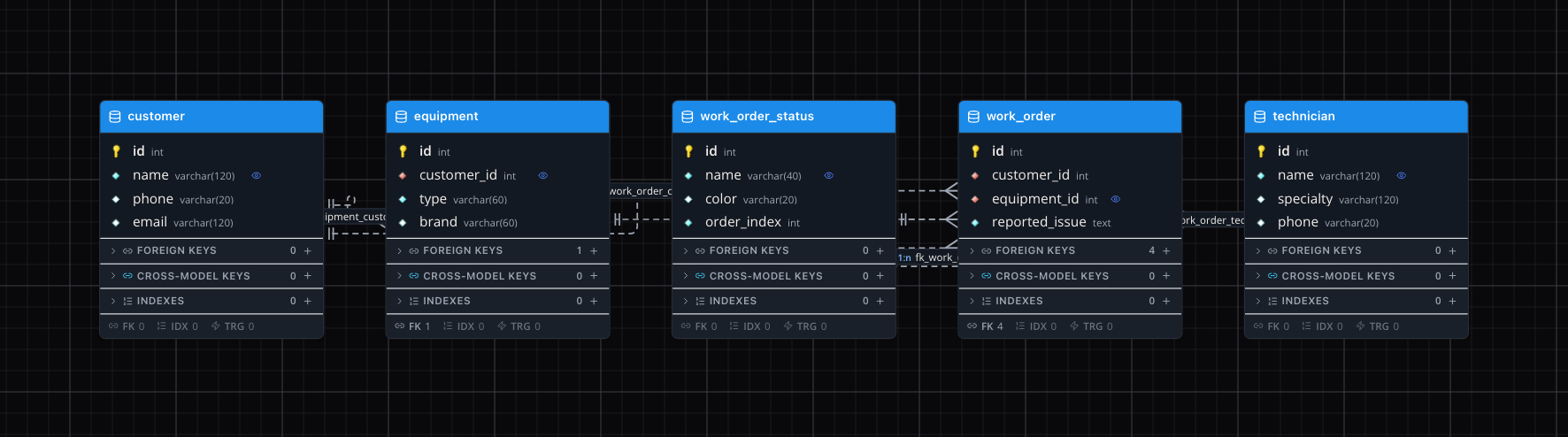
Afterwards, it launches the system in the Online Test itself, logs in as the admin user and checks the screens it created. And you're not stuck with what the AI did. Everything opens in the visual editor. Here, the technician field becomes a list with the team's names, in a few clicks.
Every change becomes code right away, in your project's Blade and PHP. In the service order document, each field is linked to the customer and equipment data, right in the panel.
Done. This is the system running, with two hundred and twenty-nine service orders registered. The list view has search, filters and pagination, ready for the team's day-to-day. The form shows the equipment and the technician by name, with amounts and dates in the right format.
In the dashboard: revenue, orders by status, each technician's workload and revenue by brand.
And the service order comes out as a PDF, ready to print and hand to the customer.
From the request to a running system, with Laravel code that is yours. Try it now at madbuilder dot dev.
From diagram to deploy, in the same project.
Modeling, building, testing and publishing all work on the same files. Nothing gets exported along the way.
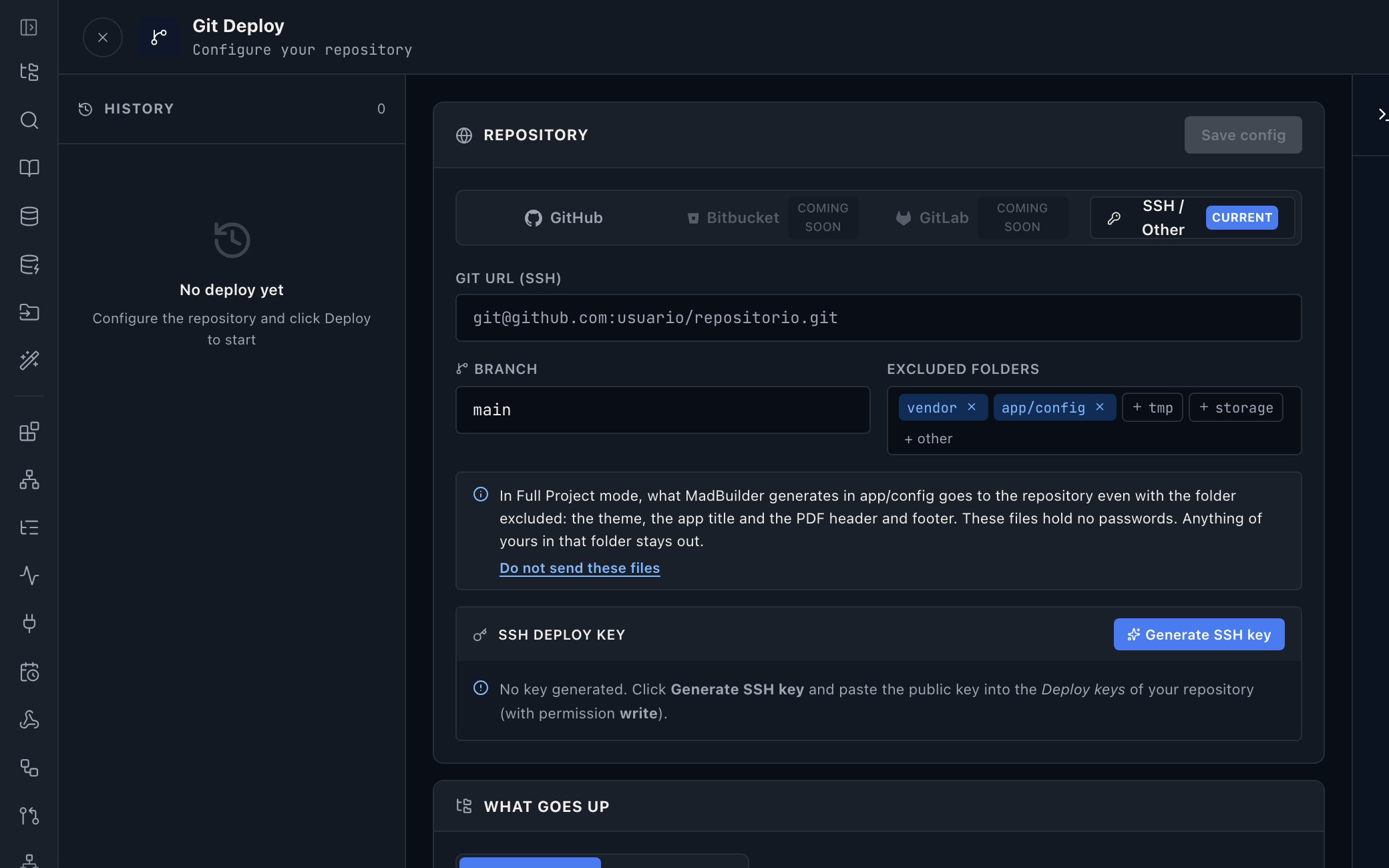
Data modeling
Tables and relationships in a diagram, with your team alongside. Every change becomes an incremental migration.
An AI agent that builds
Ask in English. It reads the database, creates the missing tables and generates the screens from ready-made components instead of writing everything from scratch. That is why it spends 65% to 75% fewer tokens.
You 14:05
Create a sales CRUD with items (master-detail): a sale has a customer, date and total amount; each item has a product, quantity and unit price. Generate the list view and the form.
Agent 14:08
- I’ll create the master-detail CRUD for sales. First I need to check the database and create the tables that don’t exist yet.
mad_db_inspect list_tables17 tables in the model, none for sales- I need to create produto, venda and venda_item. I’ll use pessoa as the customer.
mad_db_table create produtonome, preco_venda, unidade, ativo and the Produto modelmad_db_table create vendacliente_id, data_venda, valor_total and the Venda modelmad_db_table create venda_itemvenda_id, produto_id, quantidade, valor_unitario, valor_total and the VendaItem model- Tables created. Now I’ll load the MAD framework skill and generate the master-detail CRUD.
skill mad-frameworkskill loadedcrud_generate venda + detalhe venda_item2 screens created: VendaList and VendaForm
Online Test
One click spins the system up in an isolated environment, with the PHP and database you choose.
Deploy wherever you want
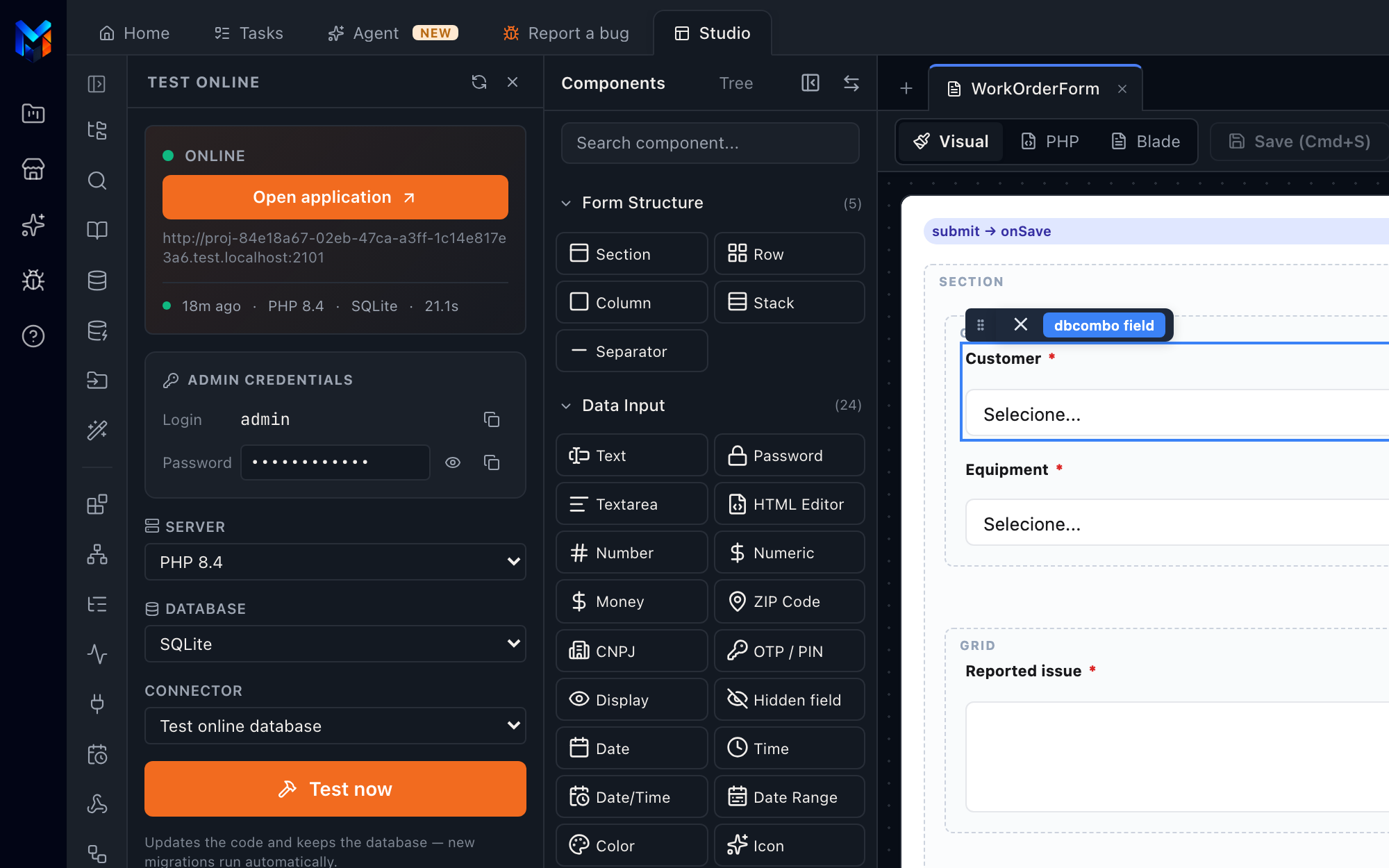
Over SSH to your server, a push to your Git or a ZIP. The code goes with it, and any dev can take over.
MadCloud
Publish without setting up a server: custom domain, HTTPS and a managed database.
- Regions
- Atlanta, or São Paulo on the private server
- Backup
- daily, kept 7 to 60 days depending on the plan
- Database
- managed PostgreSQL
- Environments
- staging and production
Bring your own agent
Claude Code, Cursor or any MCP client creates screens, models data and publishes. One token per project, every call logged.
$ claude mcp add madbuilder \
    --token mgw_•••••••• \
    --project 1042
Operations included
Errors and performance tracked without buying a separate tool, plus 2FA, audit trail and an AI copilot with your branding inside the system.
- MadTraceerrors and APM
- Audit trailincluding what the AI does
- Copilotwhite-label, in the published app
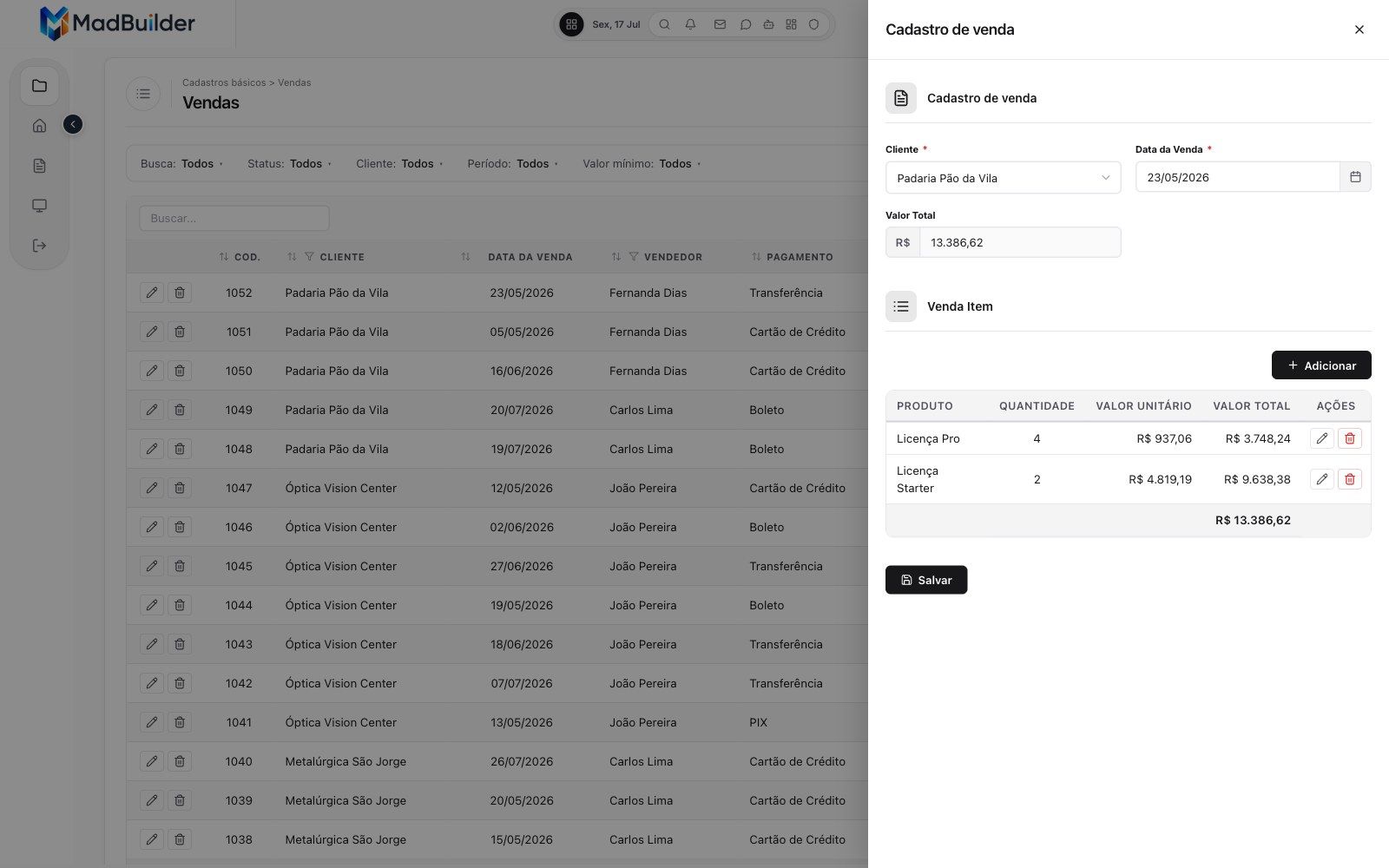
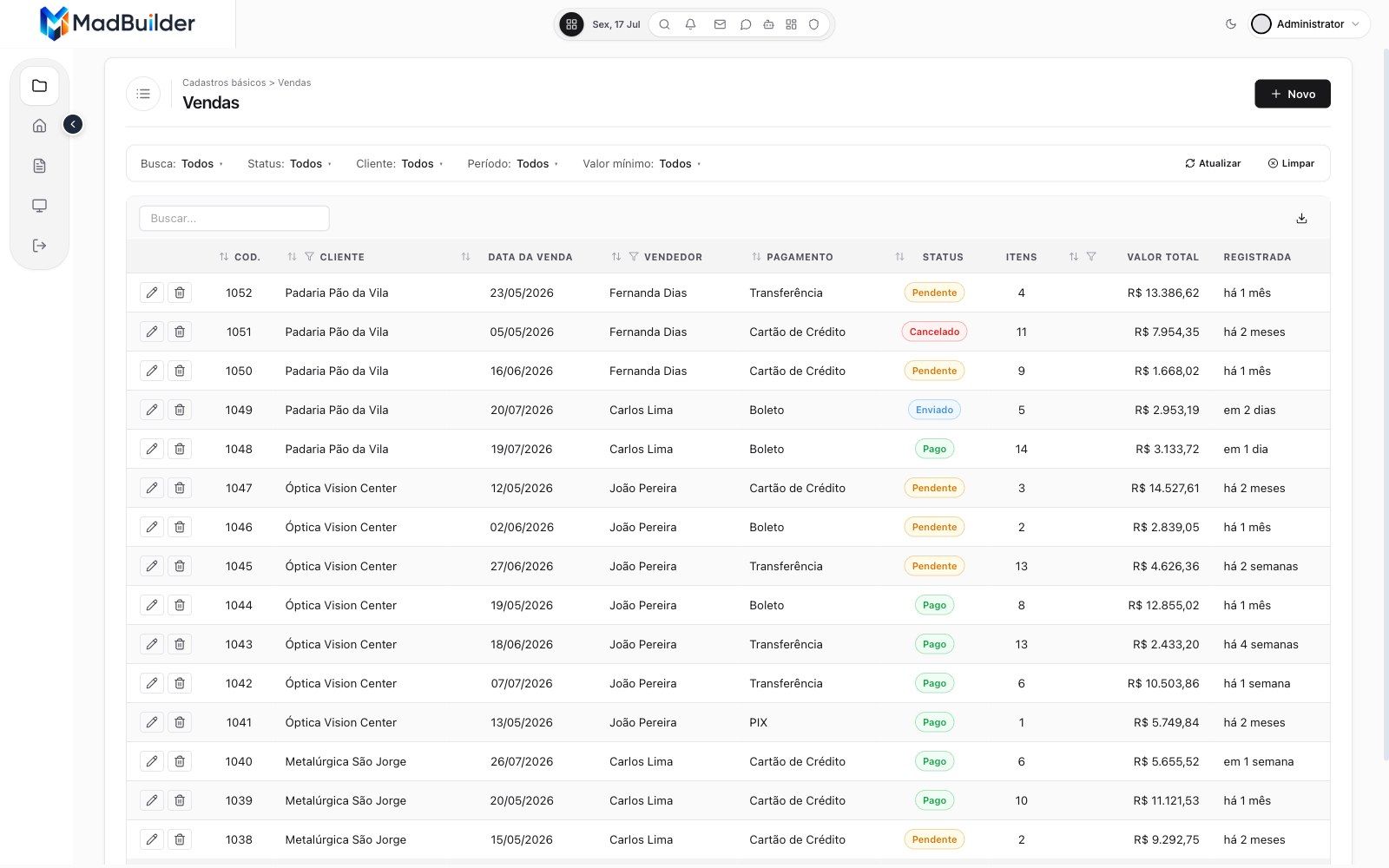
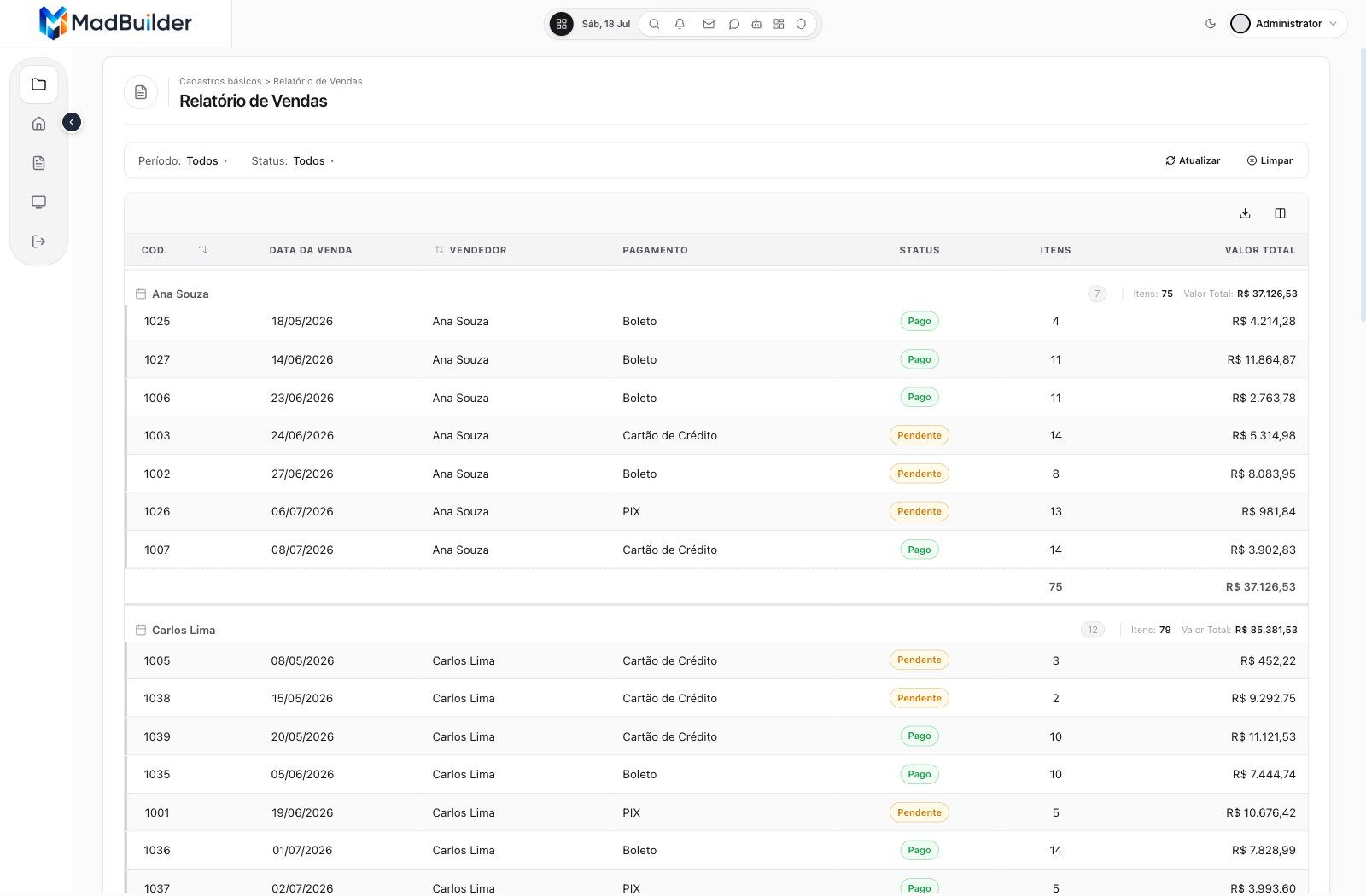
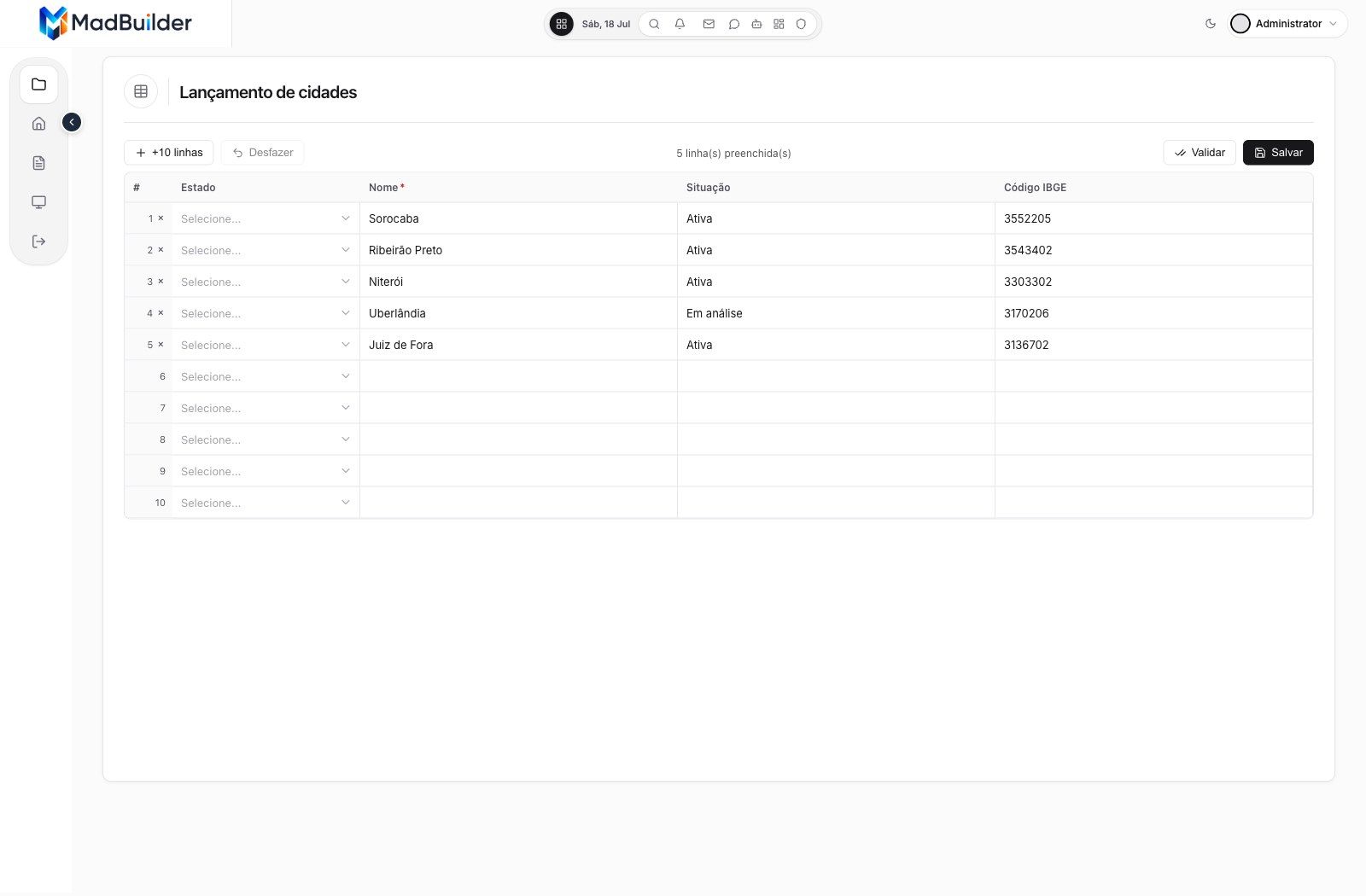
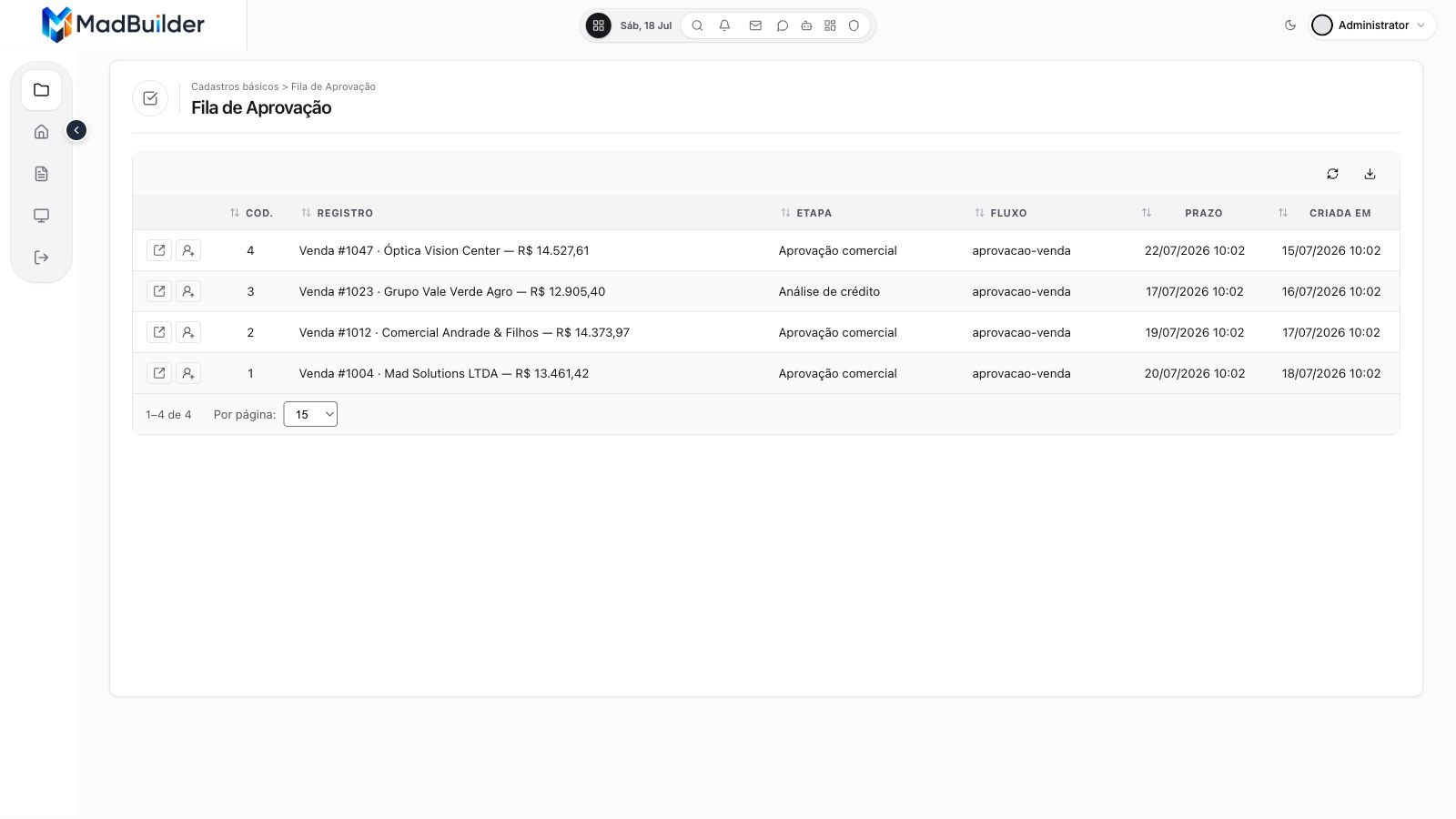
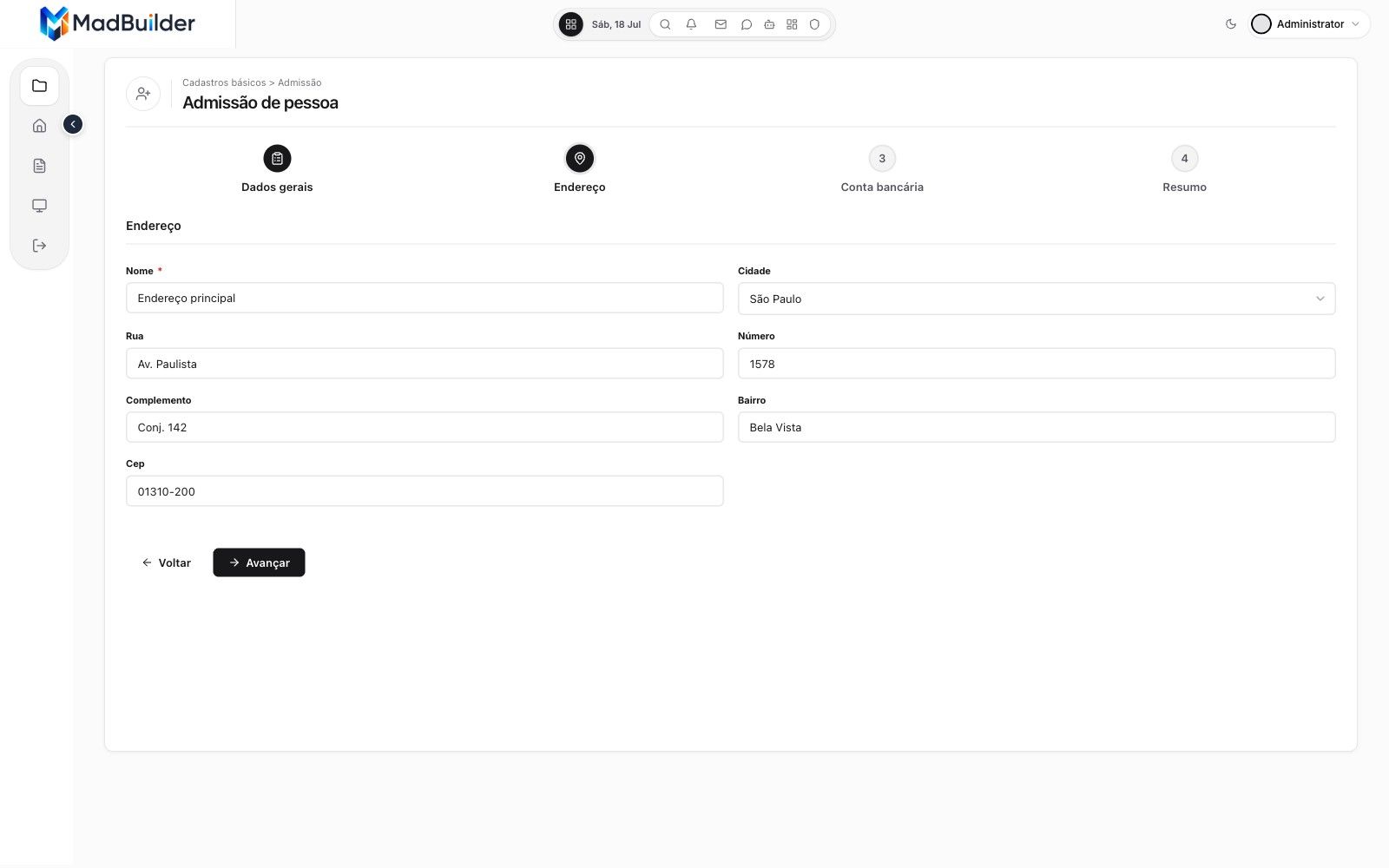
Ready-to-go screen types.
Pick the type, point it at a table and the screen comes out ready. All of these are from the sample app, running.
-
-
-
-
-
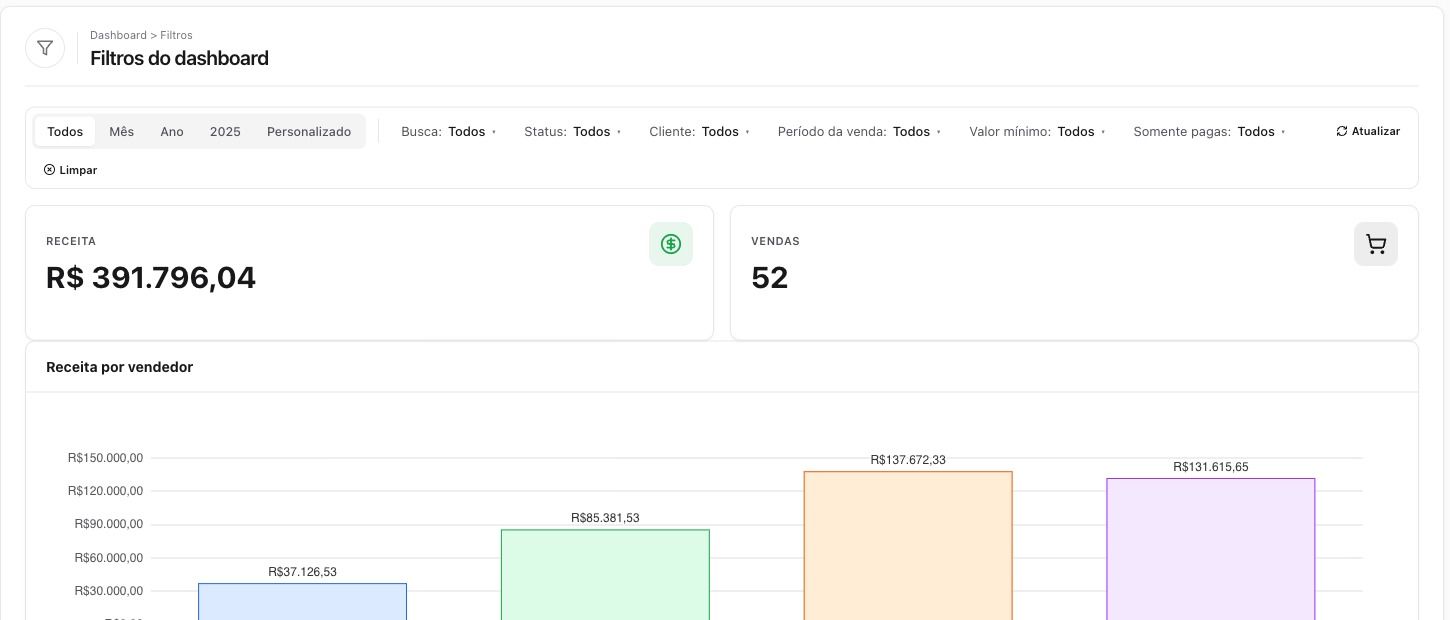
-
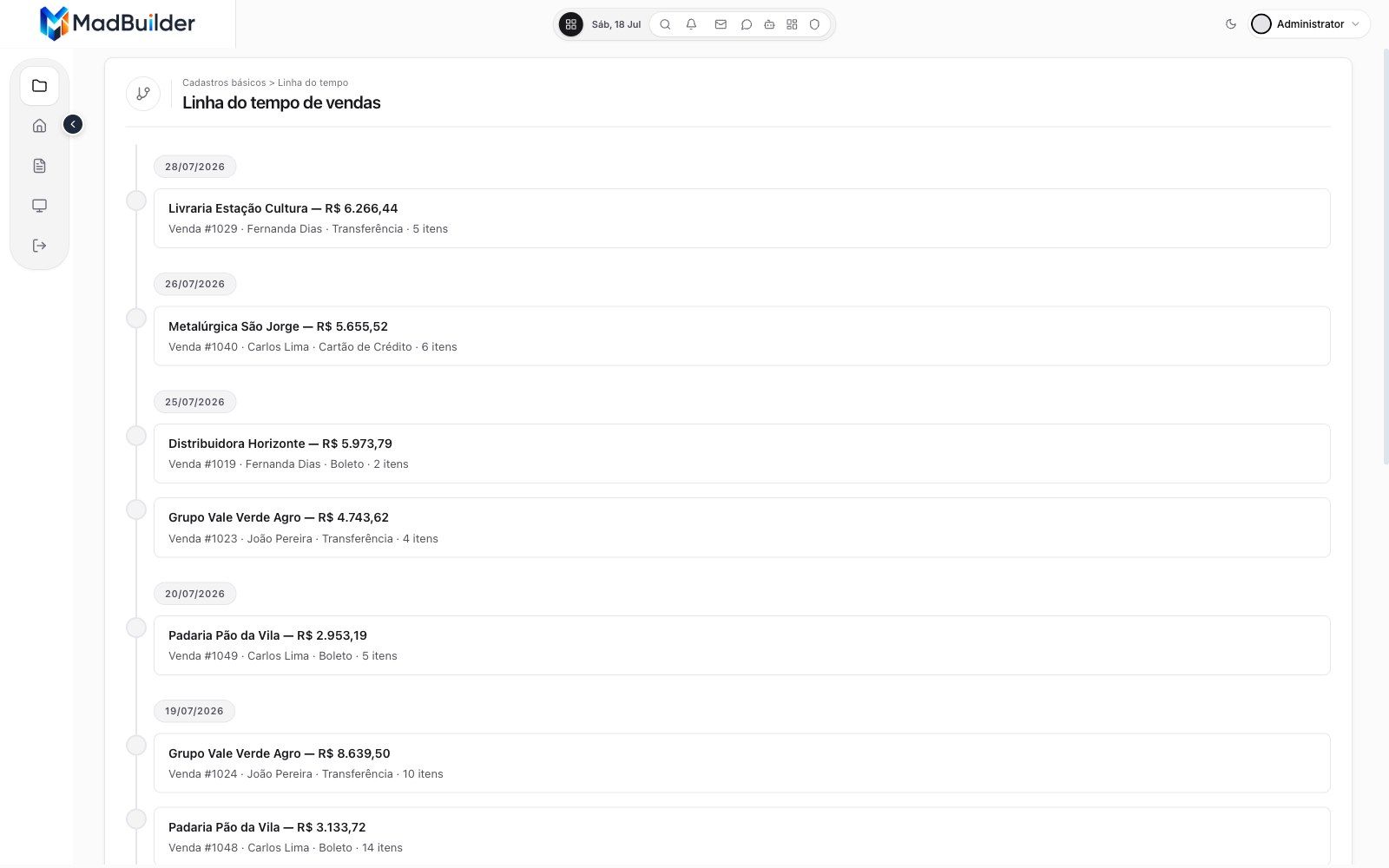
-
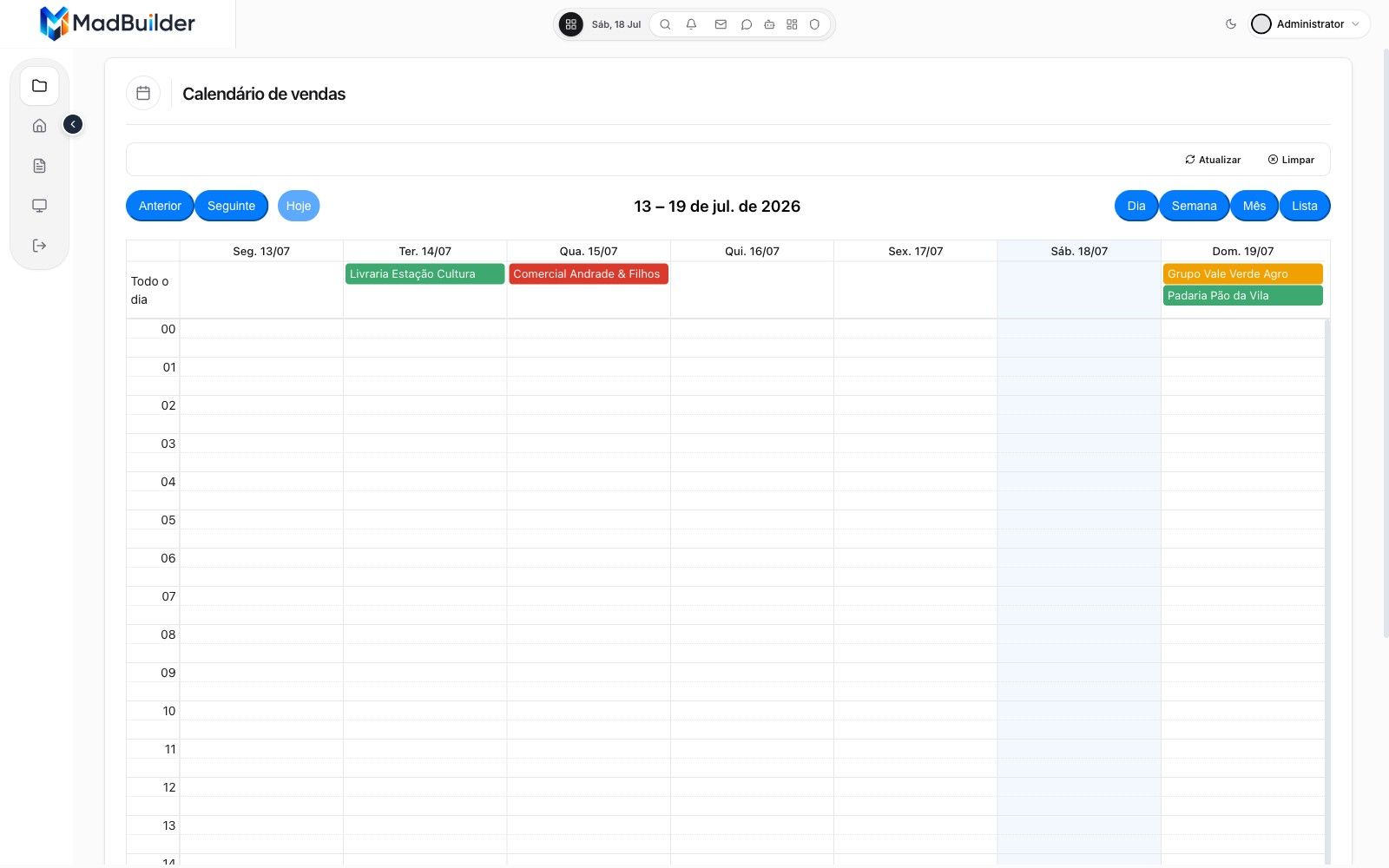
-
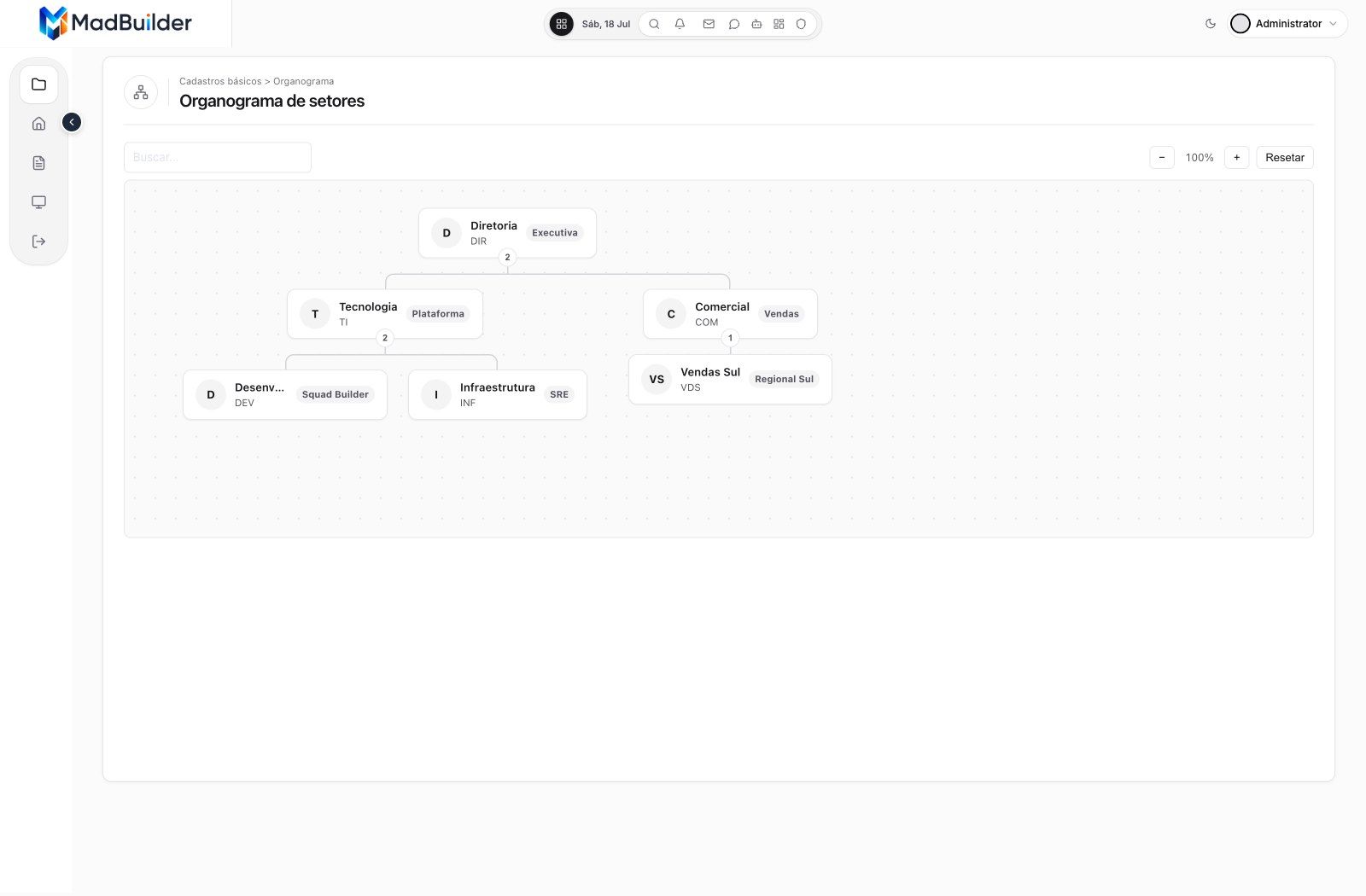
-
-
-
-
-
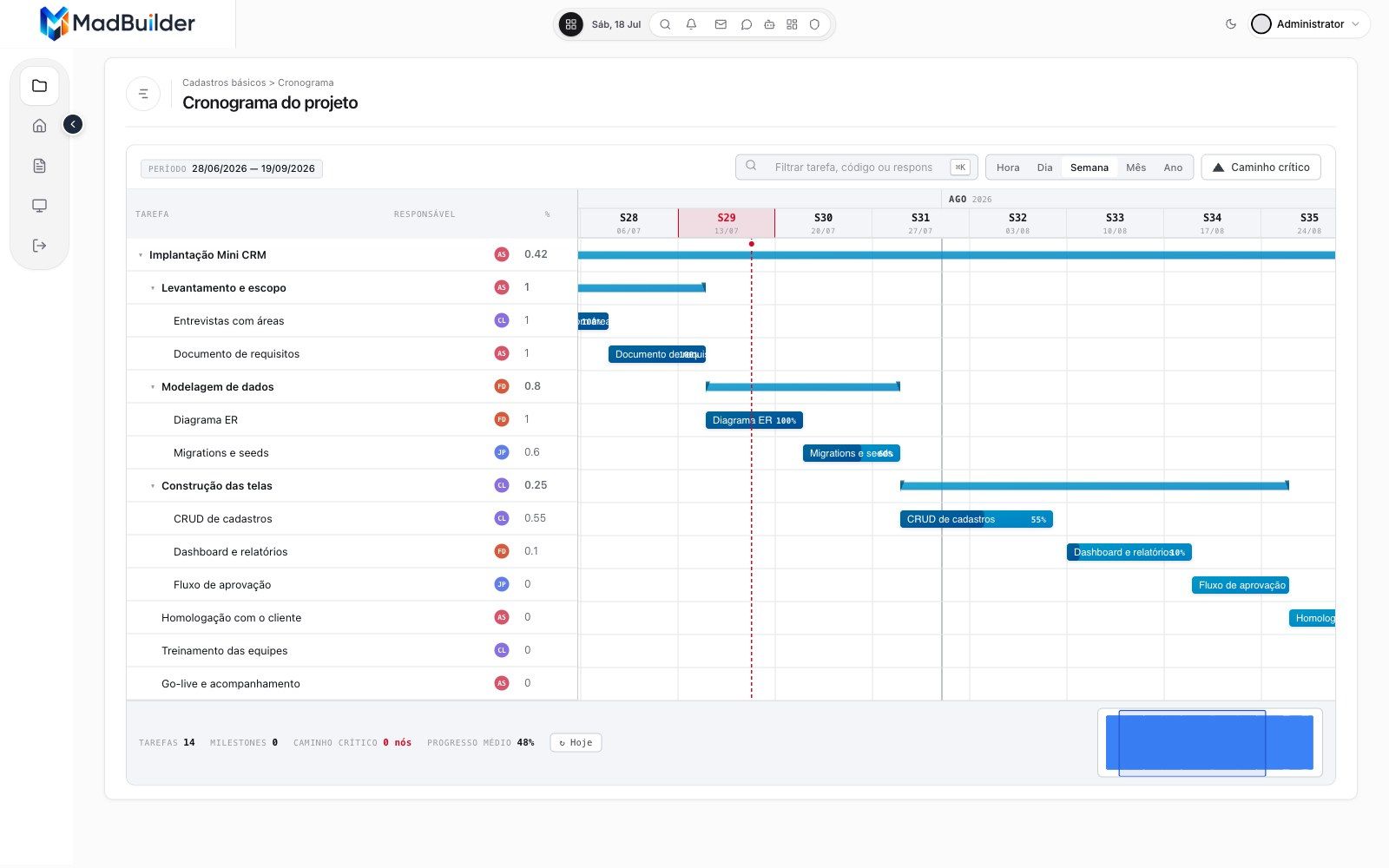
X-ray of a screen
What sits underneath every screen.
The AI agent builds screens from ready-made components instead of writing everything from scratch. Underneath each one, all of this already comes with it.
-
The screen
A real screen from a generated app.
The sales list from the sample project, exactly as it comes out of MadBuilder. Now, what sits underneath it.
-
Layer 1
Ready-made components.
There are 91 in the palette, across 9 categories, with more than 40 field types, such as CEP (Brazilian ZIP code), CNPJ (Brazilian company ID), currency and signature. Each one binds to the columns of your database.
-
Layer 2
Rules in PHP, in a plain Laravel app.
Eloquent model, controller, Blade view, route and migration in a standard project. There is no engine of ours running behind it.
-
Layer 3
Security that comes configured.
Roles define, screen by screen, who can view, create, edit, delete and export. There is 2FA and auditing, including what the AI does.
-
Layer 4
Database with step-by-step migrations.
The database is not recreated on every change: only the changes are applied, and production data stays where it is. There are six databases, from MySQL to Firebird.
-
Layer 5
Deploy wherever you want.
Over SSH to your server, a push to your Git, or to MadCloud. Every SSH publish makes a dated backup first.
-
Layer 6
Errors and performance, no separate tool.
The generated app already logs errors, measures performance, finds N+1 queries and sends alerts, with MadTrace.
One screen. All of this comes with it.
Components, rules, security, database, deploy and observability come ready in every project, and the code is yours.
For devs and CTOs
The code is yours. Open it and check.
Every screen becomes files in a regular Laravel project. Hover over a field and see the lines it generated, exactly as they come out in the download.
Generates code for the stack your team already uses
- Laravel
- Eloquent
- Blade
- Alpine
- MySQL
- MariaDB
- PostgreSQL
- SQL Server
- Oracle
- Firebird
- SQLite
resources/views/venda-form.blade.php
<mad-form submit="onSave" data-mad-entity-id="693"><mad-form-section title="Cadastro de Venda" icon="file-text"><mad-form-grid :cols="2"><mad-dbcombo-field data-mad-column-id="4533" data-mad-entity-id="693" data-mad-ref-entity-id="691" data-mad-ref-column-id="4521" data-mad-ref-display-column-id="4522" name="pessoa_id" label="Pessoa" database="app" model="Pessoa" key="id" display="{nome}" order-by="nome" order="asc" :required="true" /><mad-date-field data-mad-column-id="4534" data-mad-entity-id="693" name="data" label="Data" :required="true" /></mad-form-grid><mad-form-grid :cols="2"><mad-money-field name="total" label="Total" prefix="R$" :decimals="2" :readonly="true" /><mad-input-field data-mad-column-id="4536" data-mad-entity-id="693" name="status" label="Status" /></mad-form-grid></mad-form-section><mad-form-actions><mad-btn variant="primary" type="submit" icon="save">Salvar</mad-btn></mad-form-actions></mad-form>app/Models/App/Venda.php
<?phpnamespace App\Models\App;use Illuminate\Database\Eloquent\Model;use Illuminate\Database\Eloquent\Relations\BelongsTo;use Illuminate\Database\Eloquent\Relations\HasMany;use Mad\Database\Concerns\HasIdPolicy;use Mad\Database\Concerns\HasMadAudit;class Venda extends Model{use HasIdPolicy, HasMadAudit;protected $connection = 'app';protected $table = 'venda';// Colunas de auditoria/soft-delete desta tabela (chave ausente = desligada).protected array $madAudit = ['created_at' => 'created_at','updated_at' => 'updated_at',];protected $fillable = ['pessoa_id','data','total','status',];public static function rules($id = null): array{return ['pessoa_id' => 'required|integer','data' => 'required','total' => 'nullable|numeric','status' => 'nullable|max:20',];}public function pessoa(): BelongsTo{return $this->belongsTo(Pessoa::class, 'pessoa_id');}public function vendaItems(): HasMany{return $this->hasMany(VendaItem::class, 'venda_id');}protected static function booted(): void{static::deleting(function (self $model) {if (VendaItem::where('venda_id', '=', $model->id)->exists()) {throw new \Exception('Não é possível deletar este registro pois ele está sendo utilizado em outra parte do sistema');}});}}app/Control/VendaForm.php
<?phpuse Mad\Component\MadComponent;use Mad\Form\MadForm;use Mad\Form\MadValidationException;use Mad\Http\MadResponse;use Mad\Ui\MadMessage;use App\Models\App\Venda;use Illuminate\Support\Facades\DB;// use App\Control\VendaList;// @mad-block:user:uses {// @mad-block:user:uses }/*** @mad-generated* @mad-entity-id 693*/class VendaForm extends MadComponent{// @mad-block:config:properties {protected static string $wrapper = self::DRAWER;protected static string $title = 'Cadastro de Venda';protected static string $size = '600px';protected static string $side = 'right';public MadForm $form;// int|string: tabela cuja PK é varchar/char (código, matrícula) tem chave// de texto — `int` transformaria 'ABC-1' em 0 e salvaria no registro errado.public int|string|null $recordId = null;// @mad-block:config:properties }// @mad-block:user:properties {// @mad-block:user:properties }// @mad-block:lifecycle:mount {public function mount(array $params = []): void{$this->form = new MadForm('form');if (! empty($params['id'])) {$this->onEdit($params['id']);}}// @mad-block:lifecycle:mount }// @mad-block:lifecycle:onEdit {public function onEdit(int|string $id): void{// @mad-block:locked:onEdit:master {$venda = Venda::findOrFail($id);$this->recordId = $venda->getKey();// @mad-block:locked:onEdit:master }// @mad-block:detail-load-hooks {// @mad-block:detail-load-hooks }$this->form->fill($venda);}// @mad-block:lifecycle:onEdit }// @mad-block:lifecycle:onSave {public function onSave(): MadResponse{try {$this->form->validate(Venda::rules($this->recordId));$venda = DB::connection('app')->transaction(function () {// @mad-block:locked:onSave:master {$venda = Venda::findOrNew($this->recordId);// @mad-block:locked:onSave:master }// @mad-block:detail-save-hooks {// @mad-block:detail-save-hooks }$this->form->save($venda);$this->recordId = $venda->getKey();return $venda;});// @mad-block:combo-origin {// Tela aberta por um combo ("Sem resultados → Cadastrar novo"):// devolve a option nova selecionada e fecha o overlay. Fora desse// caso returnToCombo() responde null e o fluxo normal segue.if (($__combo = $this->returnToCombo($this->recordId)) !== null) {return $__combo;}// @mad-block:combo-origin }// @mad-block:after-save {return (new MadResponse())->toast('Registro salvo com sucesso!', 'success')->closeDrawer()->manageRow($this->recordId, VendaList::class);// @mad-block:after-save }} catch (MadValidationException $e) {return $e->asInline();} catch (\Throwable $e) {return MadMessage::error('Erro ao salvar', $e->getMessage());}}// @mad-block:lifecycle:onSave }// Caminho da view gerado pela plataforma a partir da PASTA DO MÓDULO.// Bloco byte-exact: NÃO edite — trocar o módulo regenera este path sozinho.// @mad-block:locked:view-name {protected function viewName(): string{return 'venda-form';}// @mad-block:locked:view-name }// @mad-block:lifecycle:view {protected function view(): string|array{$replaces = [];return [$this->viewName(), $replaces];}// @mad-block:lifecycle:view }// @mad-block:user:functions {// @mad-block:user:functions }}- app
- Control
- VendaForm.php
- VendaList.php
- PessoaForm.php+ 5 telas
- Models/App
- Venda.php
- Pessoa.php+ 2 models
- Control
- database/migrations
- …_create_app_tables.php
- …_add_app_foreign_keys.php
- resources/views
- venda-form.blade.php
- venda-list.blade.php+ 6 views
- routes/modules/generated.php
- composer.jsonlaravel/framework ^13.8
Real Laravel
Eloquent model, controller, Blade view, route and migration in a standard project. There is no engine of ours running behind the scenes.
Your code survives
The @mad-block lines mark where your code lives. When the screen changes and the file is generated again, what is inside them stays as you left it.
No lock-in
The framework that runs the system is open source, under the MIT license, and comes in through Composer like any PHP package.
In the system you deliver
The system ships knowing how to work.
Copilot, kanban, point of sale, documents, permissions and billing come built into the system MadBuilder delivers, wired to your database.
Ask the system, get the chart.
Your customer asks in plain English and Copilot queries the system’s own database to answer, with nobody talking about tables.
Copilot and dashboards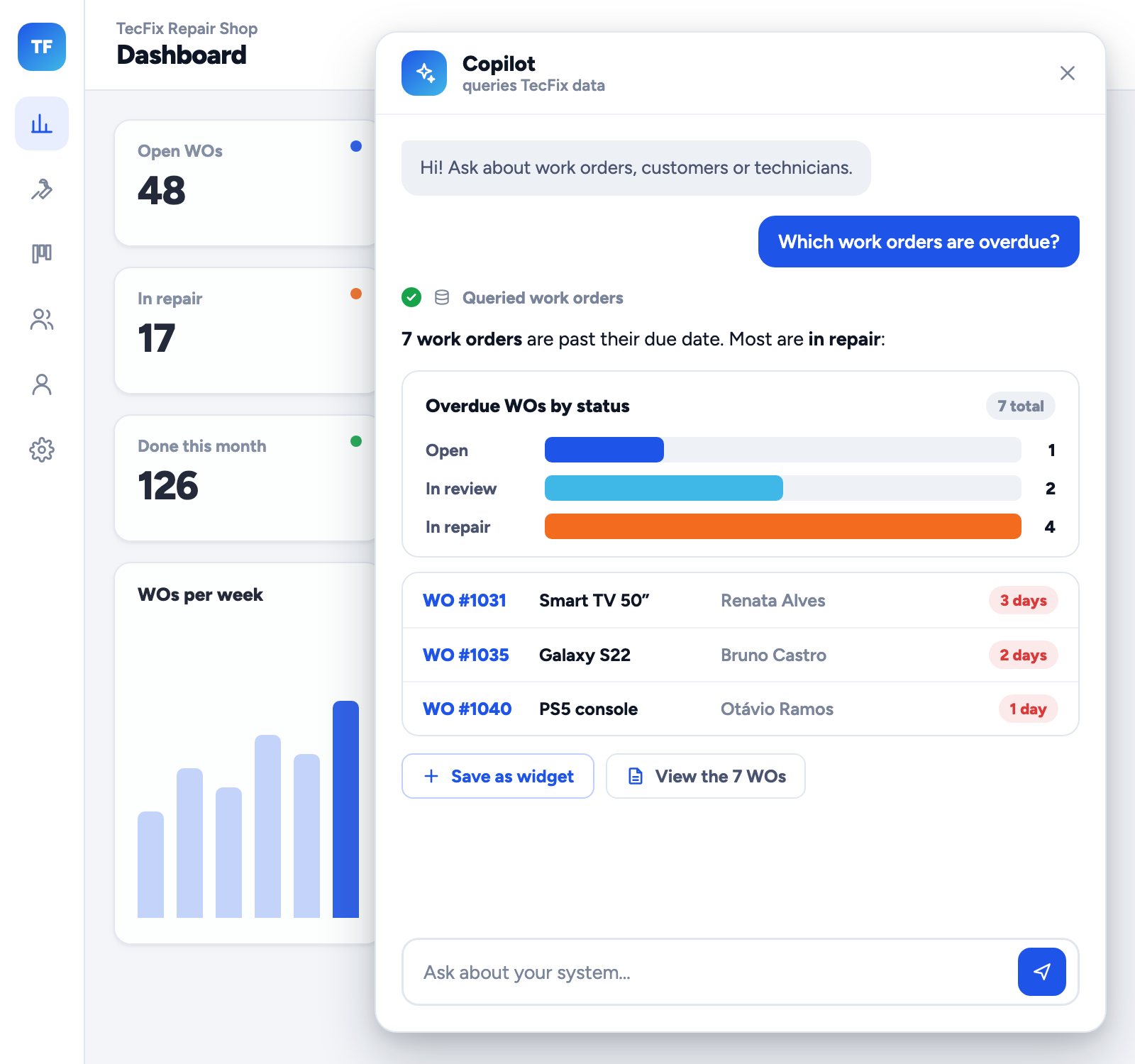
Each role does only what it can.
View, add, edit, delete and export, screen by screen. The server refuses the action; it doesn’t just hide the button.
Administration and security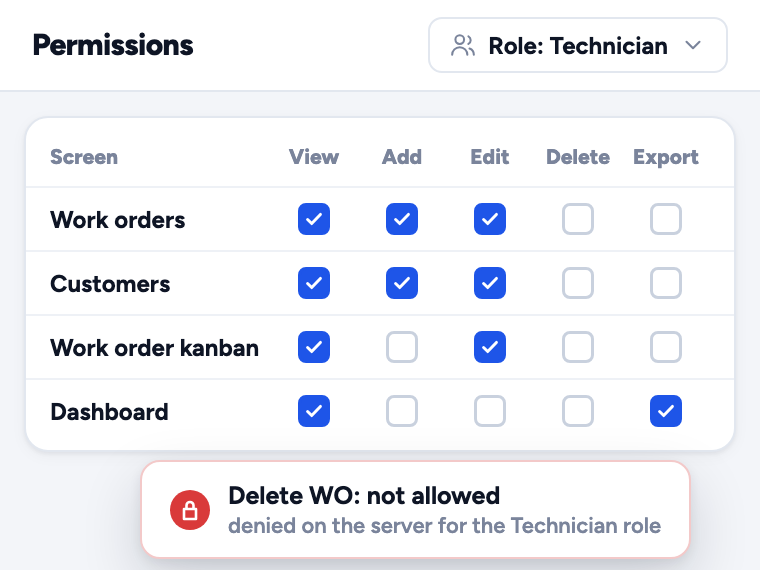
The work order becomes a PDF with a QR code.
Items, totals and signature, with its own link and the same access control as the screens.
POS, documents and finance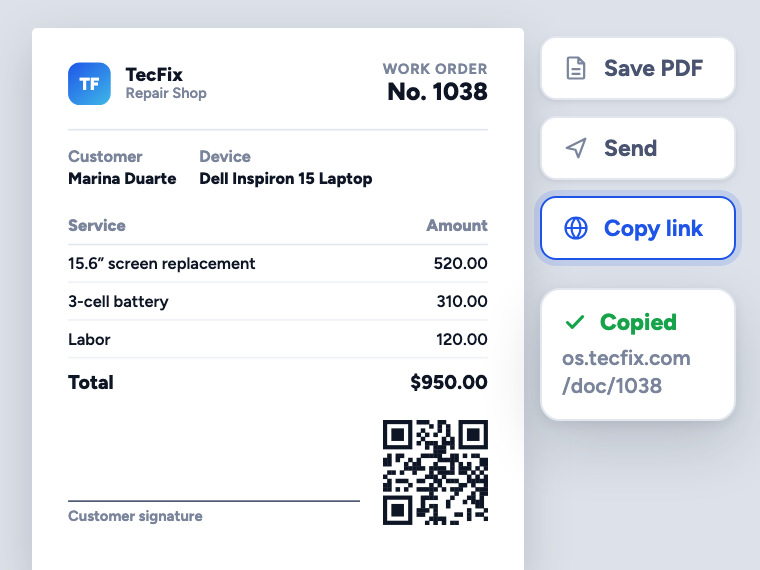
A checkout open in the browser.
Barcodes, split payments with change and a non-fiscal receipt. The sale deducts from stock.
POS, documents and finance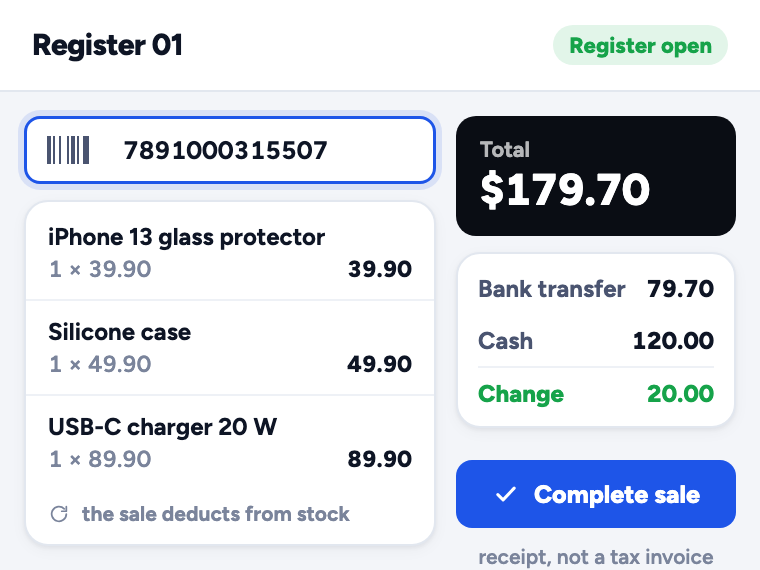
Drag the card, it’s saved.
The kanban comes already wired to your tables, with a count and total per stage. Calendar, Gantt and reports too.
Ready-made screens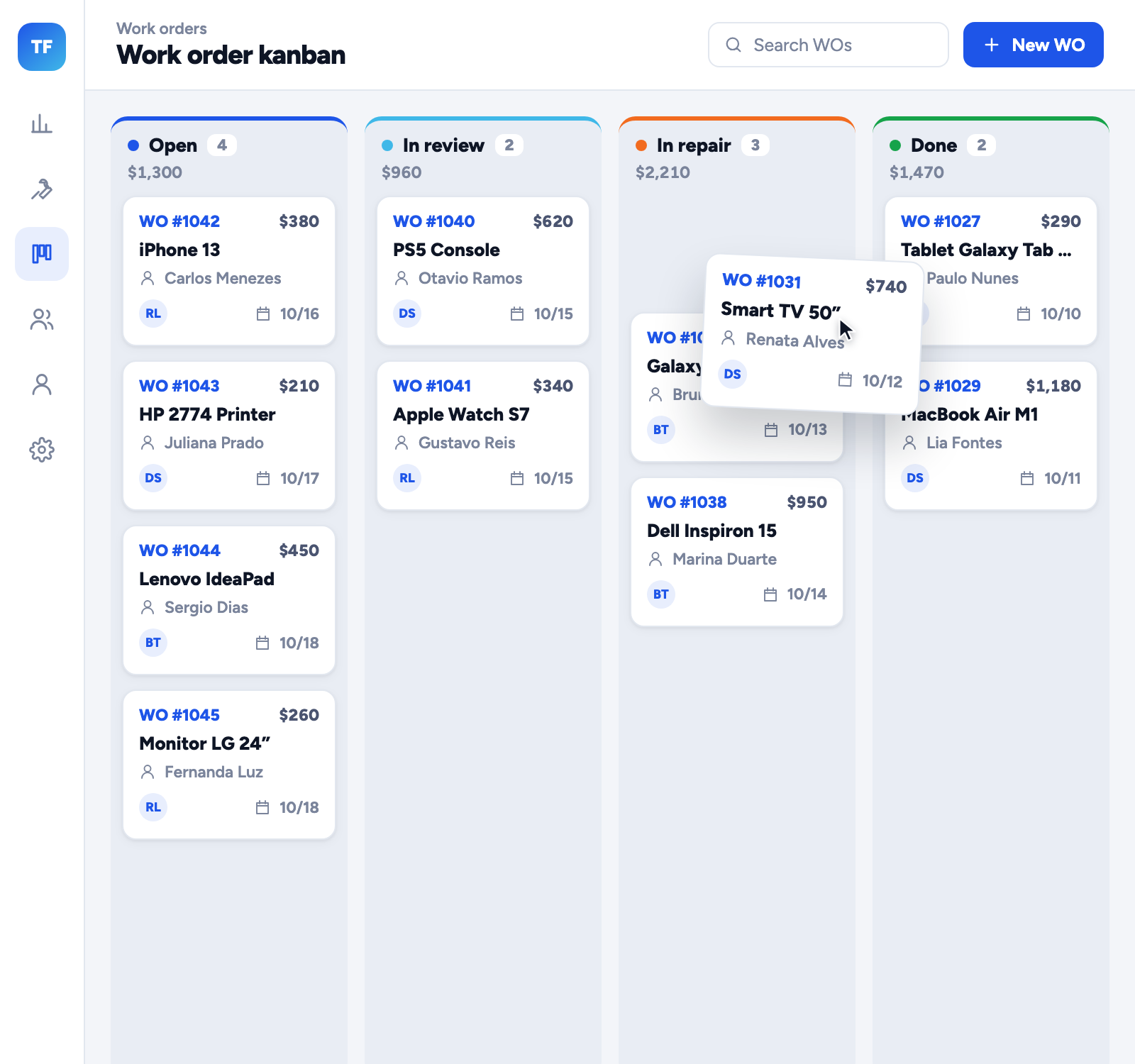
Sell the system by subscription.
Plans per module and monthly billing by Pix, card or boleto, with a late-payment flow and a subscriptions dashboard.
SaaS and multi-tenancy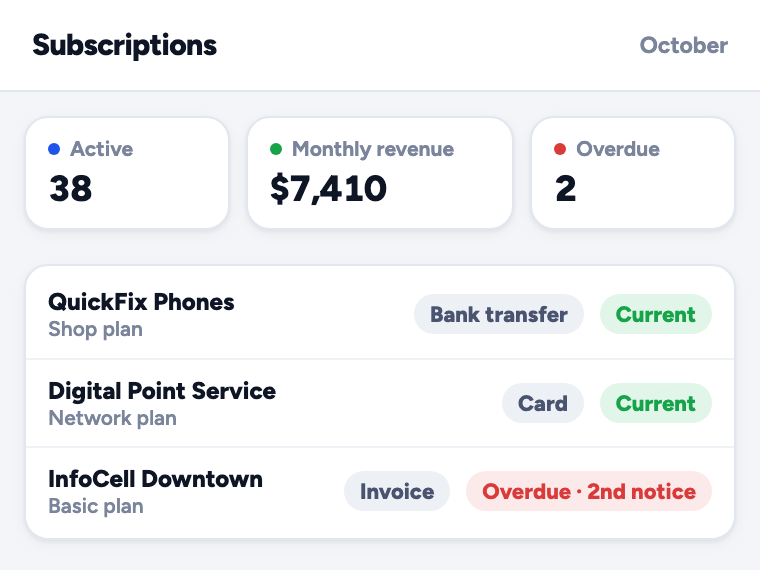
Ask for your first system today.
Create an account, describe what you need and watch the agent build and test it in Online Test. Open beta, no credit card.
- Create an accountOpen beta, no credit card.
- Build a screenVisually, in code, or by asking the AI.
- Download the .zipA Laravel project that runs wherever you want.
