


MadFood: your own delivery system for pizzerias and restaurants
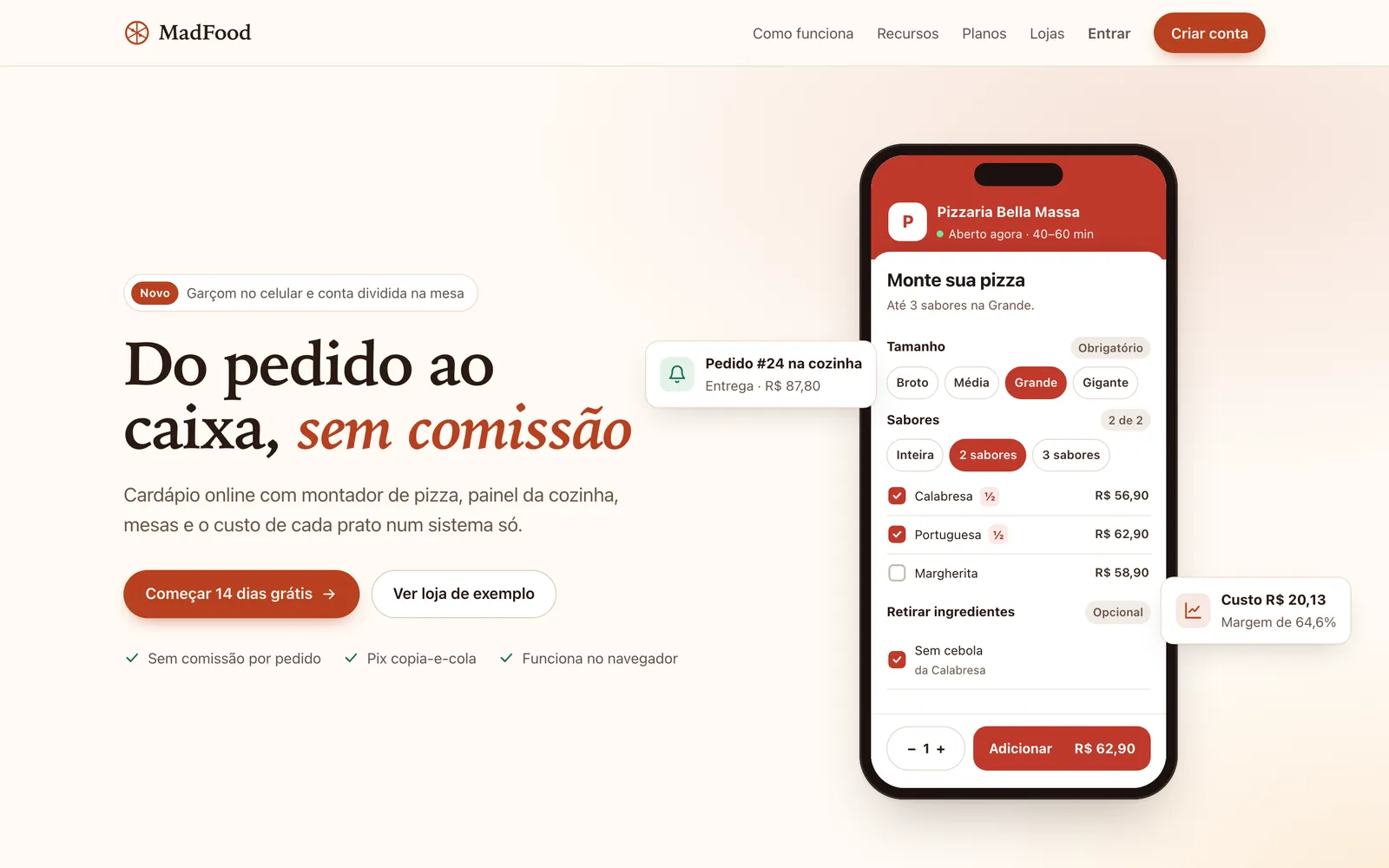
Customers build their pizza on their phone and pay with Pix. The kitchen, the dining room and inventory work together, with multiple locations and the cost of every dish. No commission per order, because the system is yours.
MadFood is a ready-made delivery and management app for pizzerias and restaurants: an online menu with half-and-half pizza, Pix, a kitchen screen, tables, inventory and the cost of each dish. It's a one-time payment of $— and runs in the browser, with no app to install.
In the demo, the Try it now button creates a sample pizzeria just for you, with no sign-up. If it's idle, it takes about 15 seconds to open. Buying requires logging in to your MadBuilder account.
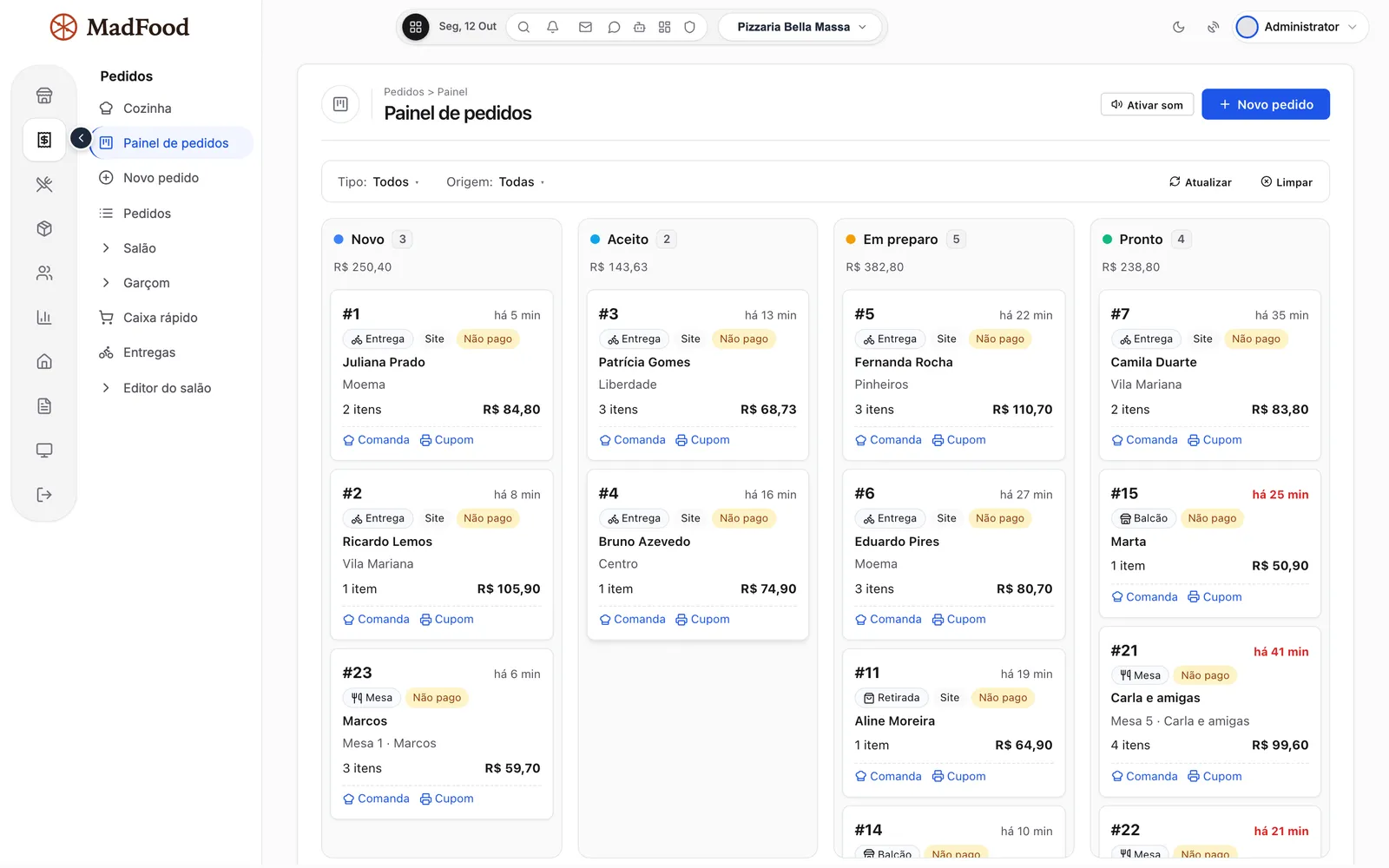
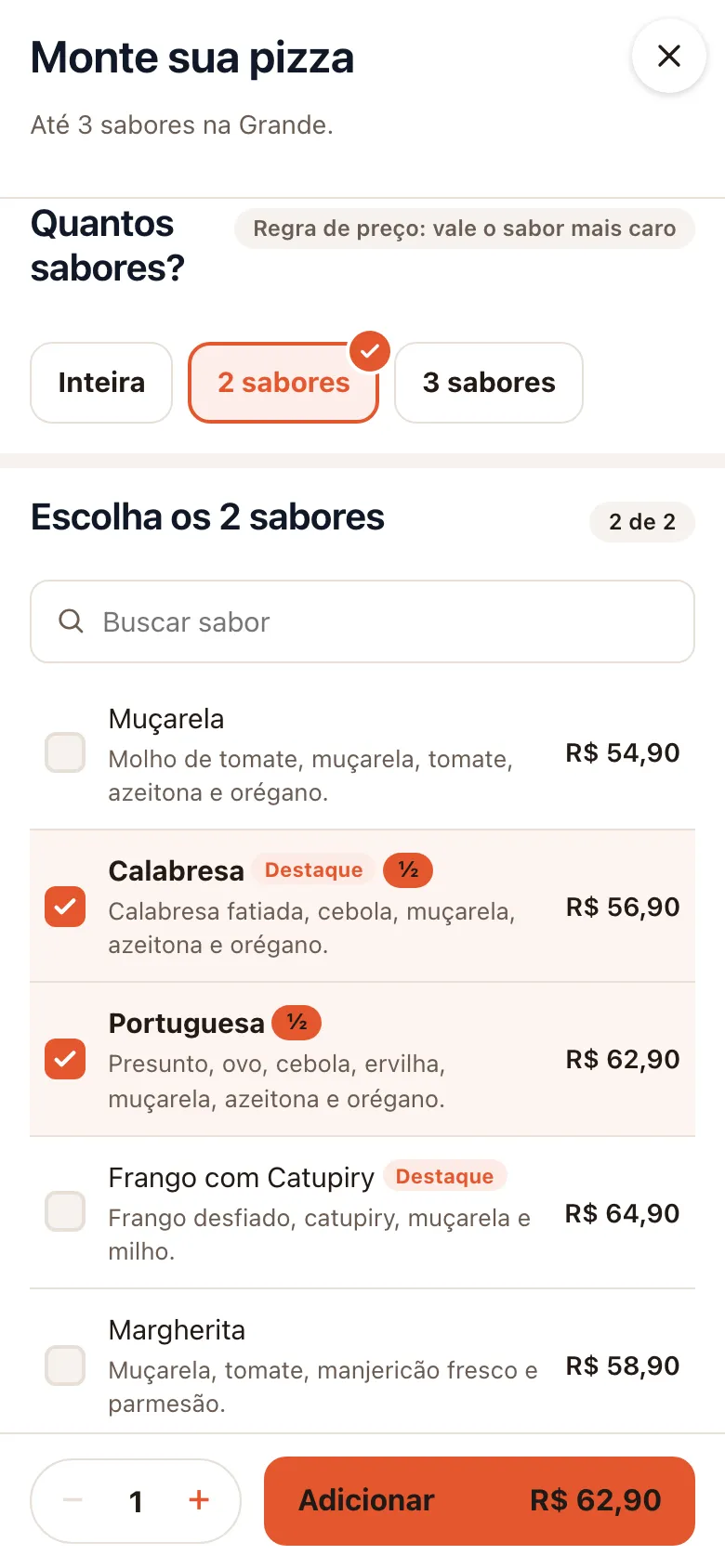
Your browser couldn’t play this video. Open the video file
Read the transcript (in Portuguese)
A full pizzeria, and part of the profit goes away in commission. Orders jotted down on paper, that get lost. And you don't know what your pizza really costs you. MadFood. Your own delivery, kitchen, dining room and costs, in a single system. The customer opens your menu on their phone and builds the pizza: up to four flavors, half and half, with crust, and no onion on one of the halves. The price shows up instantly, by your store's rules. They choose delivery or pickup, with a fee by neighborhood, minimum order and a coupon at checkout. They pay with Pix: the QR code and the copy-and-paste code carry the exact order amount. And they follow the order on a page that updates by itself. The order already shows up on the store's panel: website, table and counter, each in its own stage. In the kitchen, a screen for a TV or tablet: orders in order of arrival, with the time of each one and the removed ingredient highlighted. One tap on ready, and it leaves the queue. At the counter, the phone order uses the same builder as the menu, and the quick sale has its own register. In the dining room, the map shows free and occupied tables, the waiter enters items from their phone, and when it's time to close the check it splits per person, with a service charge. Every dish has a recipe card: the system calculates the cost, the margin and the suggested price. Stock goes down by itself with every order, and highlights what is below the minimum. The daily panel brings together sales, orders, average ticket and cost of goods. Discount coupons and a loyalty card that issues the reward by itself. More than one store? Each with its own menu, hours and delivery area. And the sales website, with plans and sign-up, comes along: you resell to other restaurants. Everything is adjusted in the MadBuilder Studio, and the project and the code are yours. One-time payment, and no commission on orders. Hosting and your MadBuilder account plan are separate. Try the demo now, on the MadFood page, at madbuilder dot dev.
A system for pizzerias, burger joints and restaurants
A system for pizzerias and restaurants that brings together online orders, the counter, the kitchen and the back office. Every part below is a screen that comes ready-made.
- PizzeriaHalf-and-half builder with up to 4 flavors, crust and dough, price calculated on the spot, and a recipe card for every flavor in every size.
- Burger jointBurgers with add-ons chosen as single choice, multiple choice or by quantity, plus a sample burger-joint menu to start from.
- Restaurant with a dining roomTable map, tabs opened from the waiter's phone, a QR code on each table, and bills split by person or by item.
- Multi-location chainEach location has its own menu, opening hours, delivery area, tables and staff, plus its own online menu address.
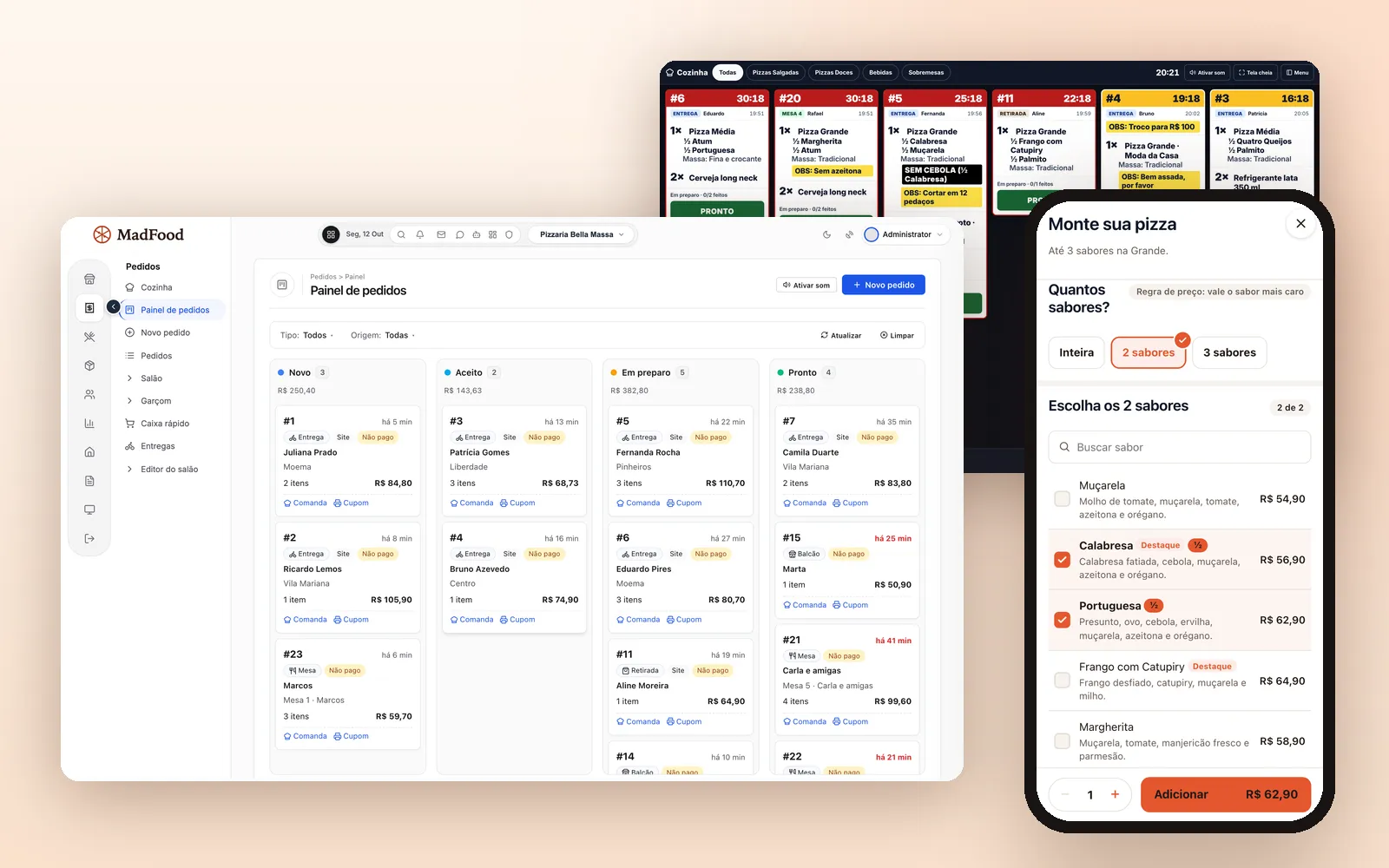
Your own delivery and online ordering, with no commission per order
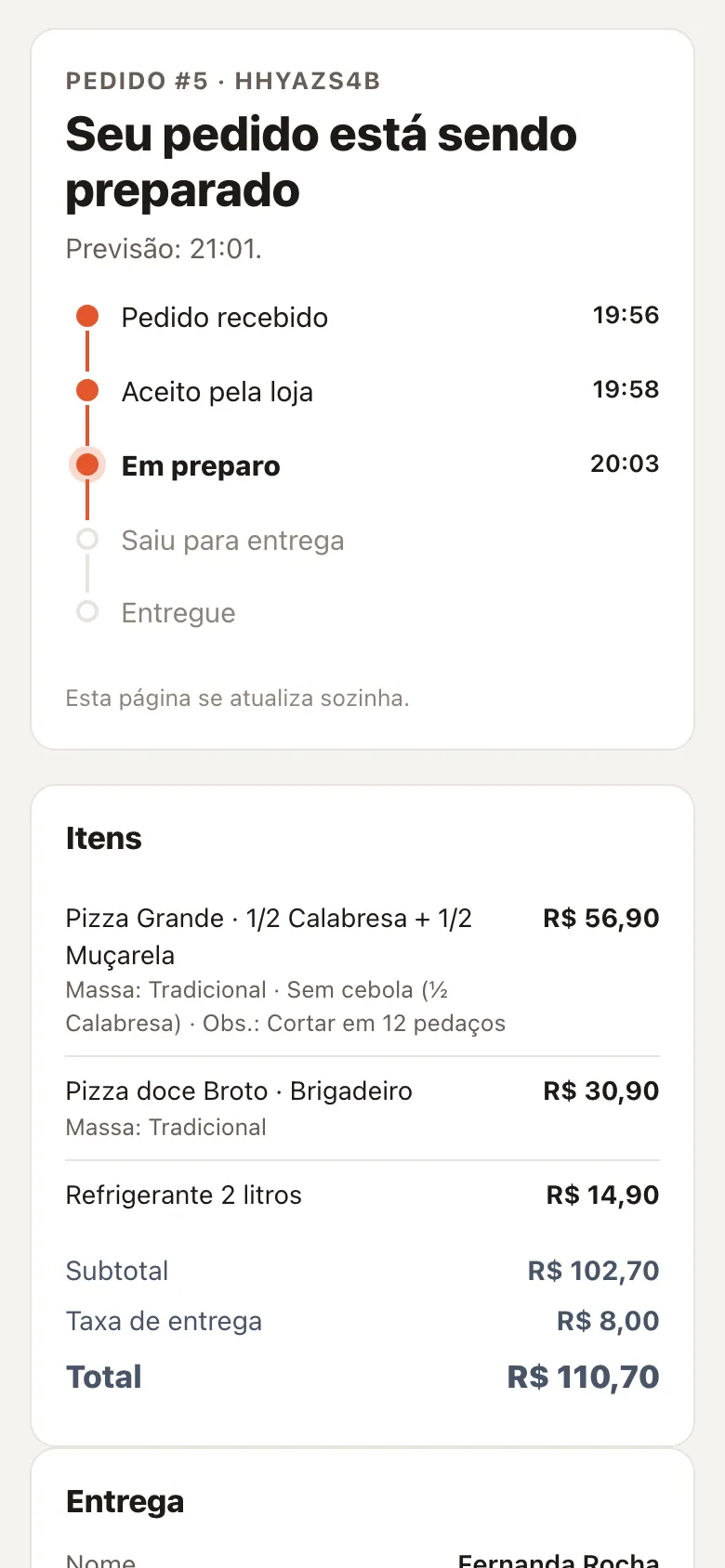
Each location gets its own online menu address and a QR code to promote it. Customers order there, in their phone browser, and follow the order on a page that updates by itself.
With Pix, they get a QR code and a copy-and-paste code with the exact order amount. The money goes straight to your account, with no middleman fee, and the location checks it and confirms the payment in the panel. Because the system is yours, no sale pays a commission.
- Delivery fee by neighborhood, by distance or flat
- Minimum order, delivery drivers and counter pickup
- Discount coupon applied at checkout
Digital menu with half-and-half pizza
The builder makes the pizza the way the customer asks for it: up to 4 flavors, crust, dough and an ingredient removed from one half only. The price shows up on the spot, following your location's rule: the most expensive flavor, the average of the flavors, or each part priced on its own.
Categories, flavors, sizes, prices, crusts and add-ons are set up per location. Burgers, drinks and desserts are regular products, with add-ons chosen as single choice, multiple choice or by quantity. To get going fast, a new location loads a sample pizzeria or burger-joint menu and adjusts it afterwards.
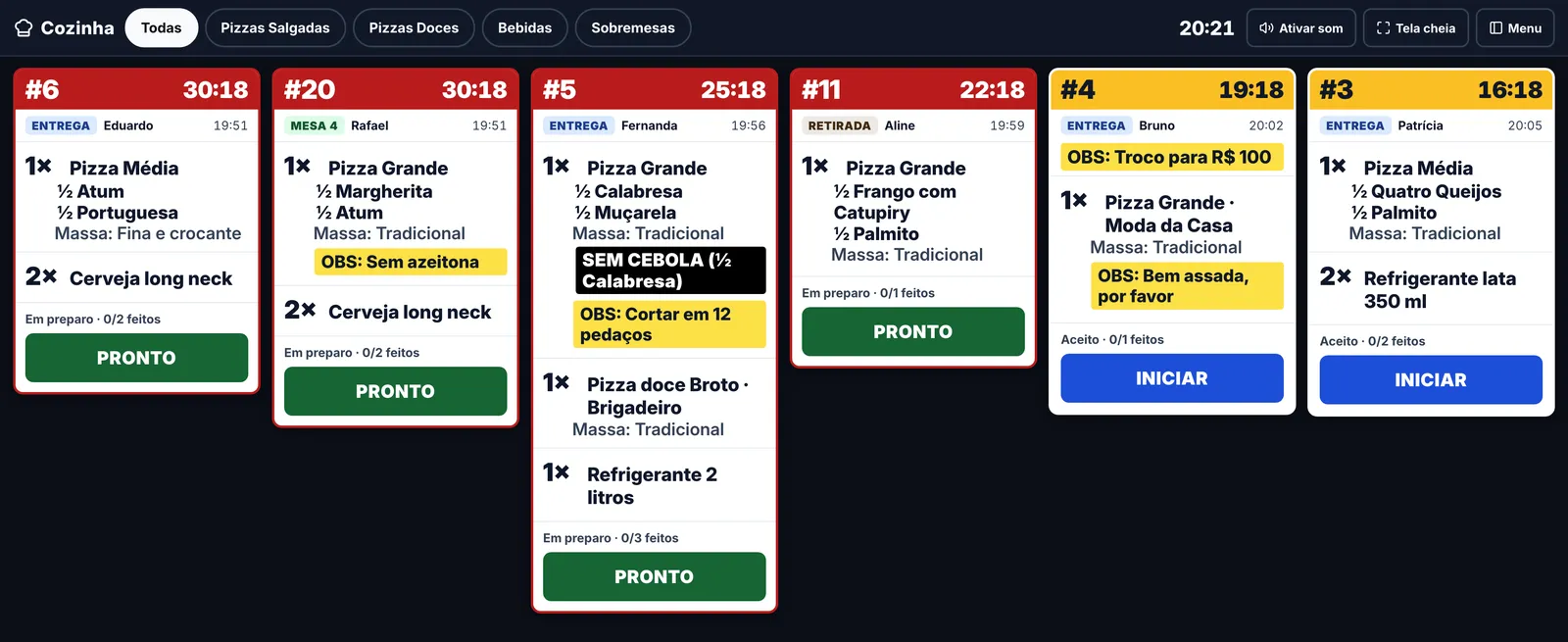
Kitchen display (KDS) with website, table and counter orders
The kitchen works on a dedicated screen for a TV or tablet. Orders arrive in sequence, with the age of each one, the notes and removed ingredients highlighted, and an audible alert announces each new order. If you prefer paper, the kitchen ticket can also be printed.
At the counter, the orders board shows each stage, from New to Ready, with website, table and counter orders together. Phone orders go in through New order, and quick counter sales have their own register.
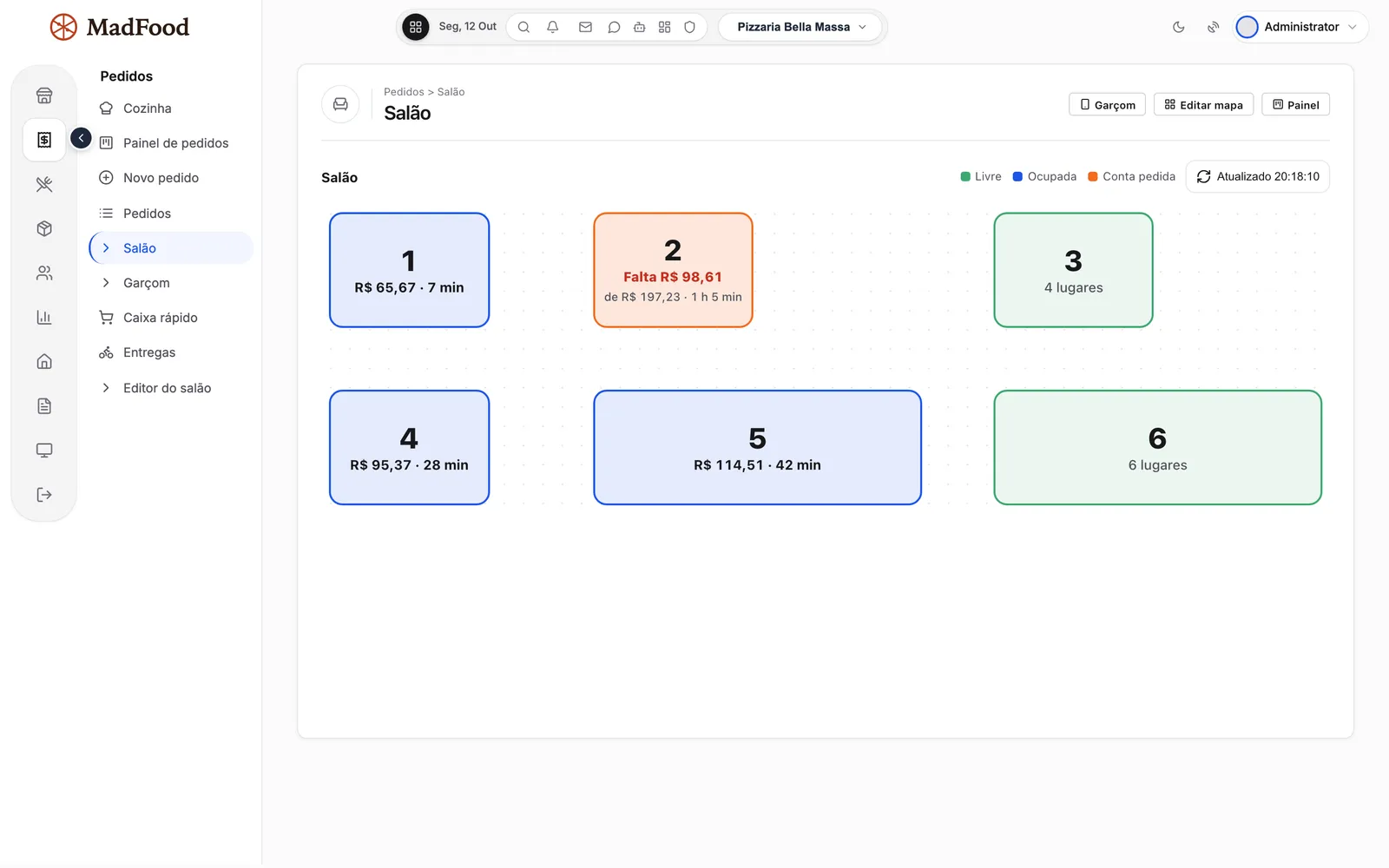
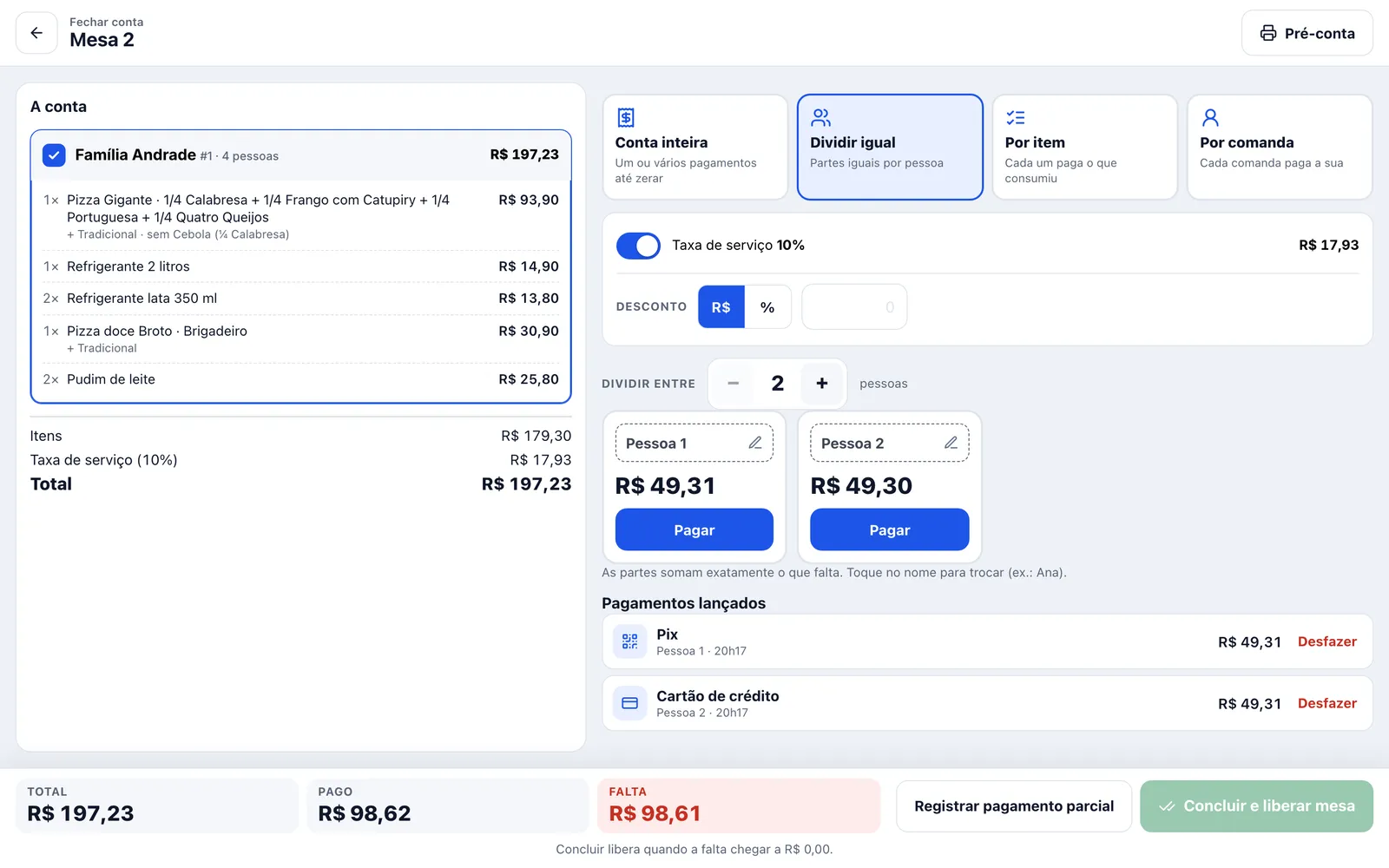
Tables and electronic tabs: dining room, waiters on their phones and split bills
The dining room map shows which tables are free, occupied or have asked for the bill. The waiter opens the tab and adds items from their phone, and customers can also order through the table's QR code, from the same menu as delivery.
To close out, the bill splits by person or by item, with an optional service charge and partial payments until the total is covered. Manager, Attendant and Waiter come as roles, and you decide what each one can do.
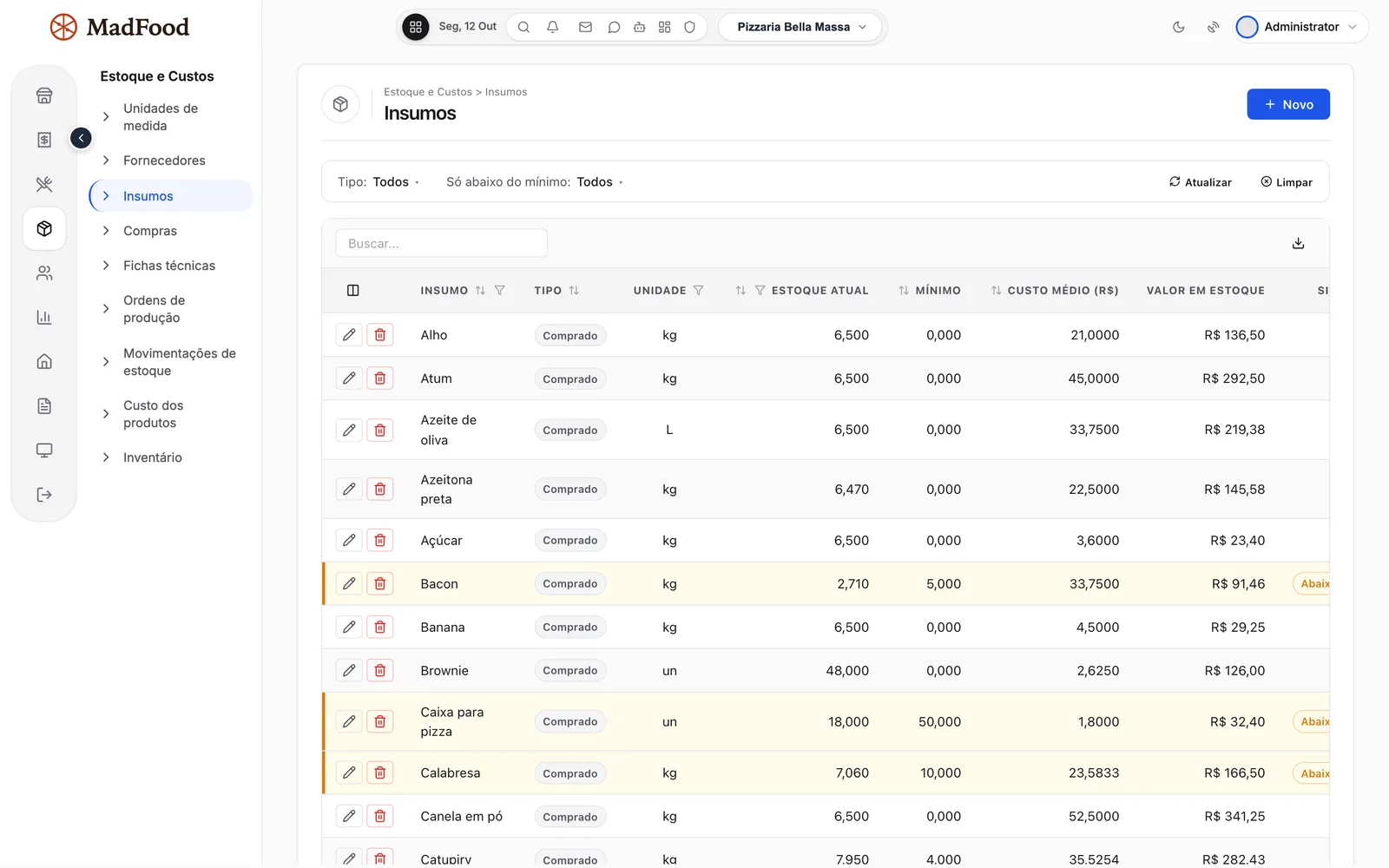
Restaurant inventory control with recipe cards and automatic stock deduction
Each product has a recipe card listing its ingredients. When an order is accepted, the system deducts stock, calculates the cost and warns you when an ingredient falls below its minimum. If you prefer, stock is deducted on delivery. A cancelled order returns what went out.
Supplier purchasing, stock counts and production orders are in the system too. House-made dough and sauce are entered as prepared ingredients, with their own recipe and the cost worked out at production.
Cost of each pizza, margin and food cost from the recipe card
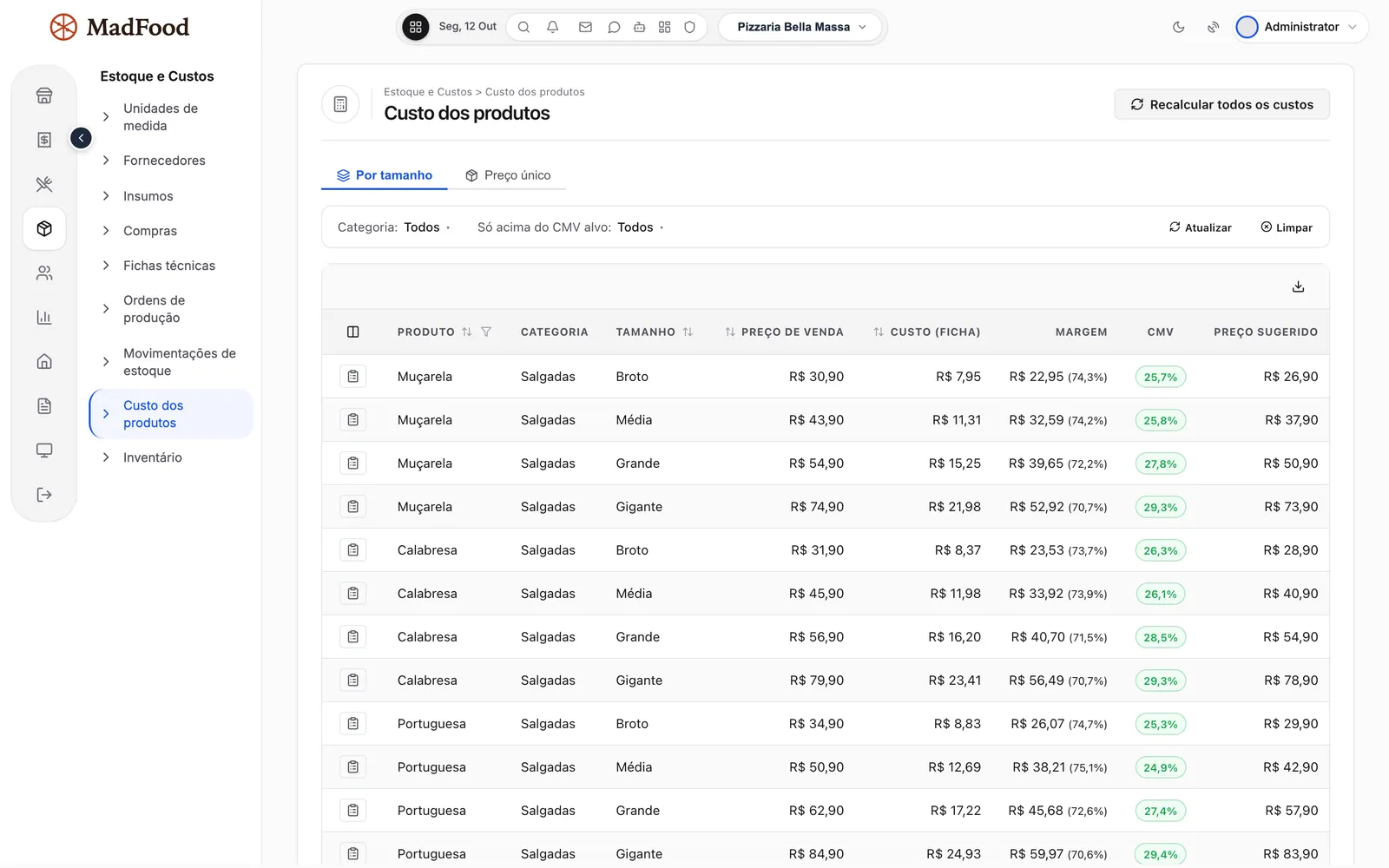
From the recipe card, MadFood calculates the cost of each pizza in each size, the margin, and a suggested price based on the food cost percentage you want. When the purchase price of an ingredient changes, the average cost follows.
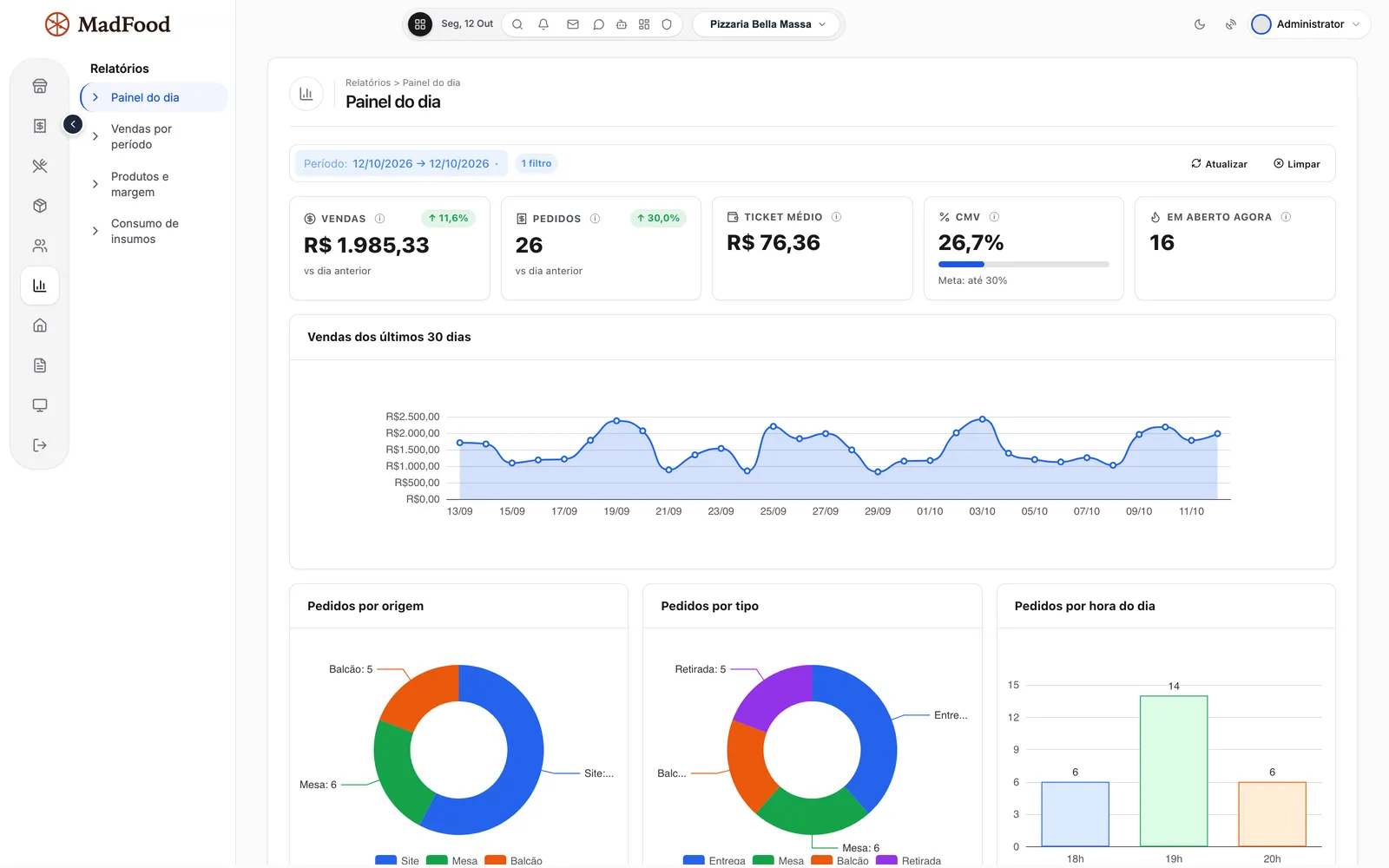
The daily dashboard brings together sales, orders, average ticket and cost of goods, with a chart for the last 30 days and orders by source, by type and by hour. Reports for sales by period, products and margin, and ingredient consumption round out the management side.
Discount coupons and an automatic loyalty card
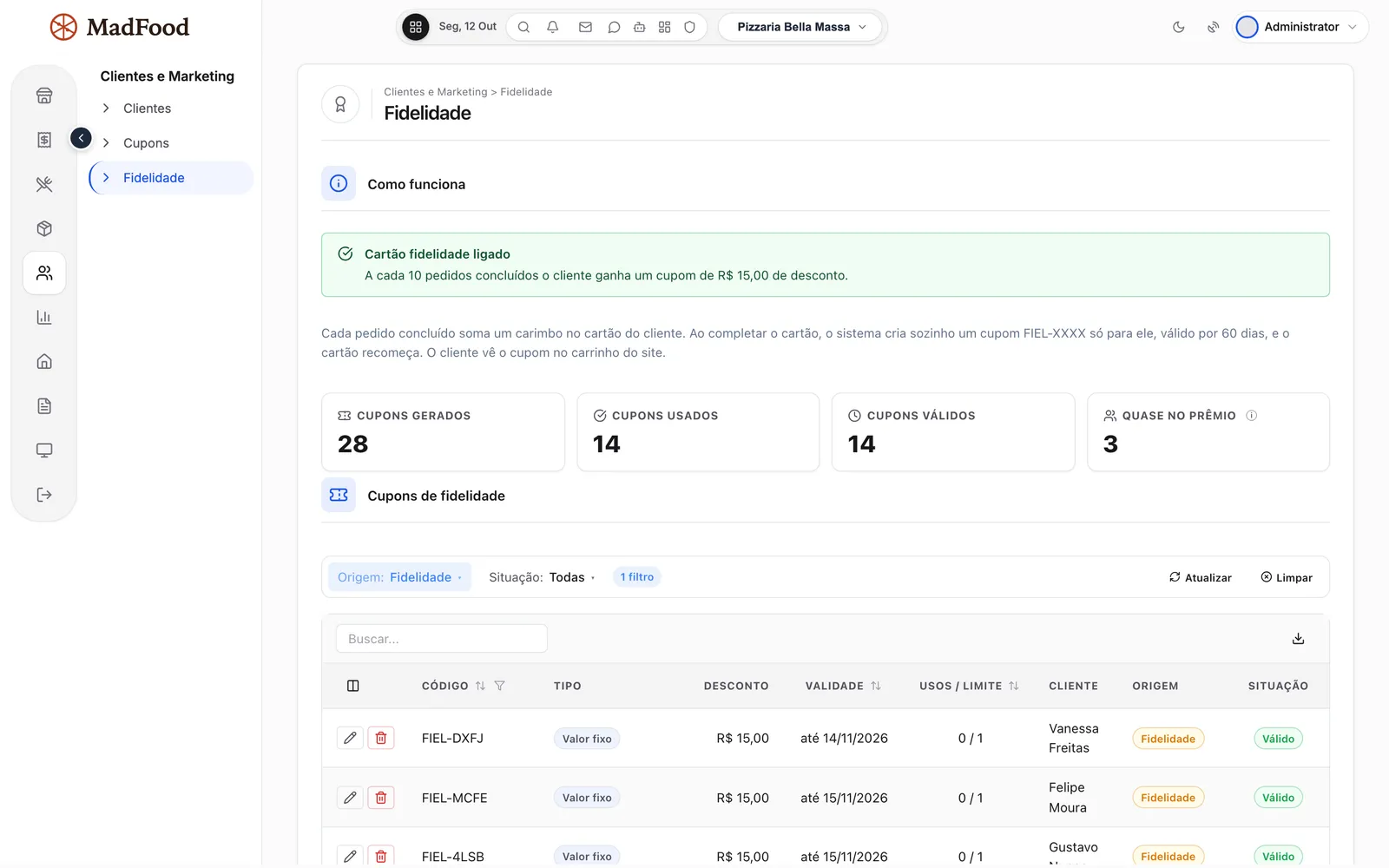
Create coupons as a percentage, a fixed amount or free delivery. The loyalty card counts each customer's completed orders and, when they fill the card, generates the reward coupon on its own.
Your customers and delivery addresses stay in your database, not in an ordering platform's.
Multiple locations in the same system
Each location has its own menu, opening hours, delivery area, tables and staff, and gets its own online menu address. Customers pick the location on the locations page, and an order for one location never shows up at the one next door.
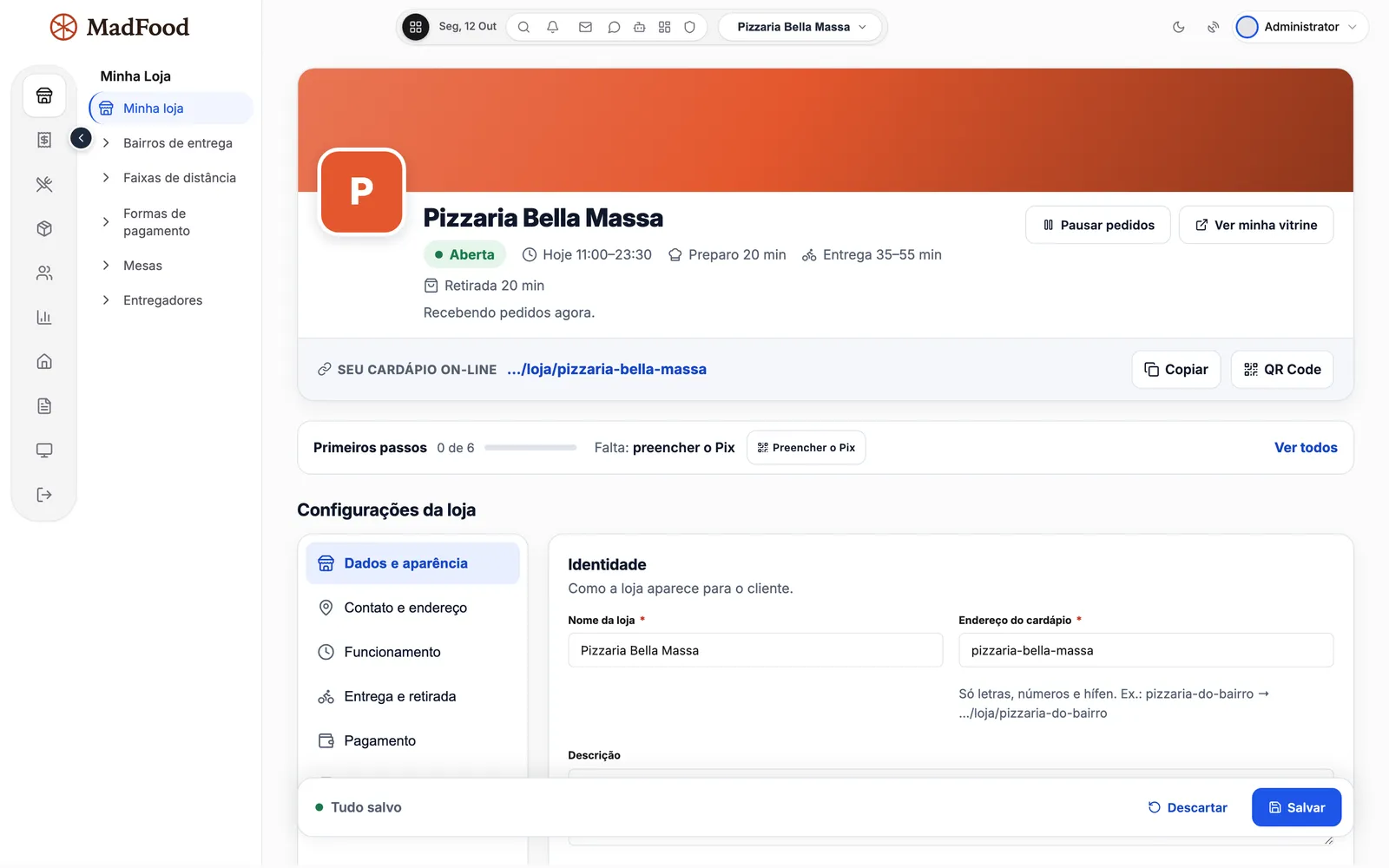
My location holds the menu address, the QR code to print and the first steps to open, such as entering the Pix key.
What MadFood costs and how buying works
$—, a one-time payment per account, with no commission on orders. Hosting and your MadBuilder account plan are separate. MadFood is a MadBuilder project: you buy it once and it becomes your own project, which you change and publish whenever you want.
- Buy onceIn the MadBuilder store, with a one-time payment through Mercado Pago. The purchase shows up under My purchases.
- Create the project in your accountMadFood becomes an independent copy, yours. In the Online Trial it opens with Pizzaria Bella Massa, a sample location with 30 days of orders.
- Adjust and publishChange screens, fields, rules and theme in Studio. Publish on MadCloud or on your own server.
What's in the project
- Every screen on this page, from the online menu to the reports
- Manager, Attendant and Waiter roles, with permissions per screen and per action
- A sales site with plans and restaurant sign-up
- The sample location with 30 days of activity, in the Online Trial only (it doesn't go into the published system)
- A step-by-step user guide under Help › Tutorials, for buyers
- The project code, which is also yours
- Built by MAD Solutions Ltda, from São Paulo, Brazil (CNPJ 51.888.856/0001-86)
What you need
- A MadBuilder account. MadFood comes in as a project and counts toward the project limit of your plan
- Hosting, bought separately: on MadCloud or on your own server
- The Pix key for each location, to get paid through the online menu
$—, a one-time payment per account. Once approved, the account can create as many projects as it wants from it.
Want to sell to other restaurants? The sales site comes with it
MadFood includes a site with a home page, plans and sign-up for new restaurants. Whoever signs up gets their own location inside the system, kept separate from the others.
Two plans, Essential and Complete, with a 14-day trial, are already created. You adjust the name, price and what each one unlocks in the admin.
Questions about MadFood
Is there a monthly fee or a commission per order?
No. MadFood is a one-time payment. Hosting and your MadBuilder account plan are separate (MadFood counts toward the project limit).
Do I need to install an app?
No. Customers order from their phone browser, through the store link or the QR code, and your staff uses the system in the browser on a computer, tablet or phone.
Can I run more than one location?
Yes. Each location has its own menu, opening hours, delivery area, tables and staff, and gets its own online menu address. Customers pick the location on the locations page.
Can each location have a different menu?
Yes. Categories, flavors, sizes, prices, crusts and add-ons are set up per location. To get going fast, a new location can load a sample pizzeria or burger-joint menu and adjust it afterwards.
How does payment by Pix work?
You enter the location's Pix key (Pix is Brazil's instant payment system), and the customer gets a QR code and a copy-and-paste code with the exact order amount. The money goes straight to your account; the location checks it and confirms the payment in the panel. There is no integration with card terminals or card gateways.
Does it work for table service?
Yes. The dining room has a table map, tabs, waiters on their phones, a QR code on the table so customers can order, and bill splitting by person or by item, with an optional service charge.
How does the kitchen receive orders?
On a dedicated screen for a TV or tablet, with website, table and counter orders together, the age of each order, the notes, and removed ingredients highlighted. You can also print the kitchen ticket.
Does inventory update by itself?
Yes. Each product has a recipe card listing its ingredients; when an order is accepted, the system deducts stock, calculates the cost and warns you when an ingredient falls below its minimum. Purchasing, stock counts and production orders are included too.
Does MadFood issue tax invoices or integrate with card terminals?
No. Payment through the online menu is by Pix, with a QR code and copy-and-paste code, checked at the location. The system does not issue tax invoices and has no integration with card terminals, card gateways or third-party delivery apps.Need something that isn't here? Seecustom development.
Open the sample pizzeria and buy when you're ready.
$—, one-time payment. The project is yours: change it in Studio and publish it anywhere.
The demo can take about 15 seconds to open. There, Try it now drops you into a sample pizzeria with no sign-up.
